
Think of WordPress chatbot plugins as smart, AI-driven assistants you can add directly to your website. These tools are your secret weapon for instantly greeting visitors, handling customer support, and snagging qualified leads around the clock, all without you lifting a finger.
Why Your WordPress Site Needs a Smart Chatbot
Having a website without a good chatbot is like opening a shop and then leaving the front counter empty. When people show up with questions and no one's there to answer, they'll just walk out. It's that simple. Customer expectations have completely changed—people want answers now, not tomorrow, and they want interactions that feel helpful. This is where a chatbot plugin can turn your static website into a lively, interactive hub.
We're way past the era of those clunky, pre-programmed bots that only frustrated visitors. Today's AI assistants are smart enough to understand what people are actually asking, tackle complex questions, and gently steer visitors toward making a purchase.
Integrating a smart chatbot isn’t a luxury anymore; it’s a fundamental tool for growth. It’s all about meeting your customers on their terms with the speed and help they’ve come to expect.
From Passive Tool to Proactive Assistant
Instead of just sitting back and hoping someone fills out a contact form, a chatbot gets the ball rolling by starting the conversation itself. That one small change can make a huge difference to your bottom line.
Just look at the immediate advantages:
- Automate Customer Service: The bot can instantly handle all the common questions, freeing up your human team to focus on the trickier problems.
- Qualify Leads Instantly: It can ask a few smart questions to figure out who's a serious prospect and send them straight to your sales team.
- Guide User Journeys: A chatbot can act as a personal shopper, recommending products, pointing people to the right blog post, or helping them book a meeting.
The demand for these tools is exploding. The market for AI-powered WordPress chatbots is on track to grow from $500 million in 2025 to a staggering $2.5 billion by 2033. This isn't just a fleeting trend; it’s a major shift in how businesses operate online. You can read the full research on this market growth to see the numbers for yourself.
To get a better sense of what these intelligent agents can do and how they're put into action, it’s worth checking out specialized AI Chat Bots services.
How AI Chatbots Actually Work on Your Website
Ever wonder what’s really going on behind that friendly little chat window that pops up? Modern WordPress chatbot plugins are much more than simple scripts. They’re sophisticated tools built to understand and talk with your visitors in a way that feels surprisingly human. The magic behind it all is a technology called Natural Language Processing (NLP).
Think of NLP as the bot's brain for language. When a visitor types, "Hey, got this in blue?" NLP doesn't just see words—it understands intent. It figures out that "hey" is a greeting, "this" probably refers to the product they're looking at, and "in blue" is a specific request about an attribute. This is what separates a clunky, keyword-based bot from one that can actually hold a conversation.
The Three Main Types of Chatbots
Not all chatbots are created equal. They generally fall into one of three buckets, and knowing the difference will help you pick the right WordPress chatbot plugin for what you're trying to accomplish.
-
Rule-Based Chatbots: These are the most straightforward. You basically build a "decision tree" with set questions and answers. If a user clicks "Shipping Info," the bot spits out your shipping policy. They work great for handling basic, predictable FAQs but get stuck the moment someone asks a question you haven't programmed in.
-
AI-Powered Chatbots: These are the smart ones. They use NLP and machine learning to understand a huge range of questions, even if they're phrased weirdly. Better yet, they learn from every conversation, getting sharper and more accurate over time. This is the kind of bot you want for handling nuanced sales questions or providing dynamic support.
-
Hybrid Chatbots: This approach gives you the best of both worlds. It starts with a solid, rule-based foundation for common queries but can seamlessly hand things over to its AI brain to tackle more complex or off-script user questions. You get both reliability and flexibility.
This infographic really drives home the core benefits a smart chatbot can bring, from delivering instant answers to pulling in more leads.
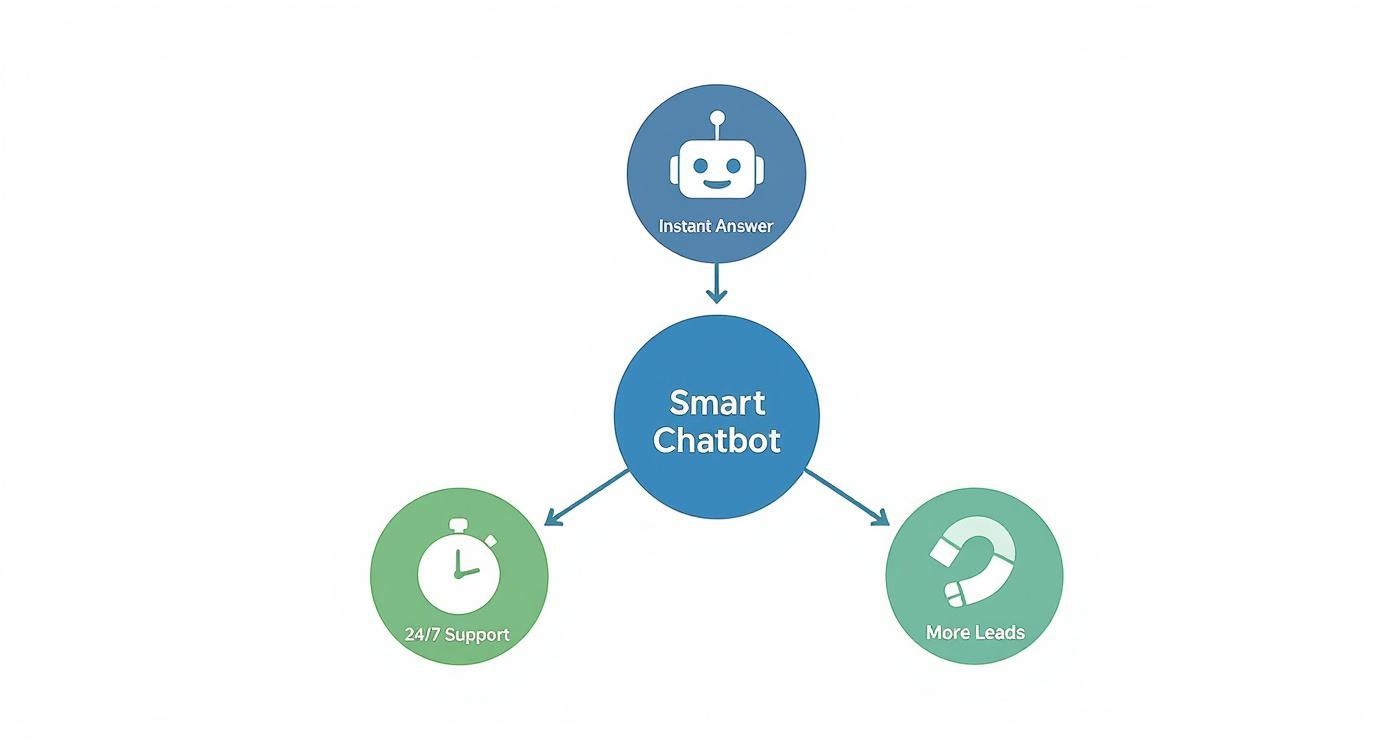
As you can see, the value isn't just about answering questions. It's about being on, 24/7, ready to help and capture potential customers the moment they show interest.
When to Use Each Type
Picking the right kind of chatbot comes down to what you need it to do. A simple blog might just need a rule-based bot to help readers find popular articles or the contact page. Easy.
But a business that lives and dies by lead generation needs an AI-powered assistant. It needs something that can qualify visitors, understand their specific problems, and naturally collect their contact details as part of the conversation.
An e-commerce store is the perfect candidate for a hybrid model. It can use rules for the standard stuff like, "What's your return policy?" but then let the AI take over to help a customer find "a waterproof hiking jacket that's not too expensive." It’s all about matching the tech to the task at hand.
The Anatomy of a High-Performing Chatbot Plugin
Diving into the world of WordPress chatbot plugins can feel a bit like wading into a deep ocean. There are so many options, and it’s tough to tell which ones are just simple pop-ups and which are genuinely powerful business tools. The secret is knowing what to look for under the hood.
A truly effective chatbot isn't just a script that answers questions. It's an active, integrated part of your marketing and sales engine. The best plugins get this right, packing in features that do more than just chat—they capture leads, personalize experiences, and ultimately, grow your business.
Just think about the scale of the WordPress ecosystem. In 2025, it's the foundation for a staggering 43.4% of all websites, and its plugin directory is home to over 60,300 options. That's a lot of choices. You can discover more insights about WordPress statistics to get a sense of the sheer size. This makes it absolutely critical to know which features will actually make a difference for you.
To help you cut through the noise, let's break down the must-have features that separate a basic bot from a business-building powerhouse.
Visual Conversation Builder
Honestly, the ability to build and tweak your chatbot’s conversations without touching a line of code is a total game-changer. A visual, drag-and-drop builder is no longer a "nice-to-have"; it's essential, especially for anyone who isn't a developer.
This kind of interface lets you map out entire customer journeys, create smart branching logic (think "if a user asks about pricing, show them this"), and inject your brand's personality into every interaction. It turns what could be a complex technical headache into a simple, creative process. If you're curious about the mechanics, our guide on how to make a chatbot walks through the fundamentals.
Seamless Integrations
Your chatbot can't operate in a silo. For it to be truly valuable, it needs to talk to the other software you use to run your business every day. This is where top-tier WordPress chatbot plugins really shine.
You should be looking for easy connections with:
- CRM Systems: Imagine a new lead chatting on your site and their contact info, along with the full conversation, landing directly in your CRM like HubSpot or Salesforce. No more copy-pasting.
- Email Marketing Tools: When a visitor gives their email to the bot, it should automatically add them to your mailing list in a tool like Mailchimp or ConvertKit.
- E-commerce Platforms: A bot that syncs with WooCommerce can become an incredible sales assistant, answering product questions, checking on an order status, or even guiding a customer through the checkout process.
These integrations are what turn automated chats into measurable business results. They make sure the valuable data your bot collects gets put to work right away, without any manual effort on your part.
Advanced Lead Generation Tools
A good chatbot is a lead-generation machine. The features should be built specifically to find, qualify, and capture visitors who are ready to take the next step. This is about more than just a box that says, "Enter your email here."
Look for tools that let you build custom forms right into the chat, book meetings directly on your calendar, and set up qualification rules. For instance, your bot could ask a few quick questions about a prospect's budget and only pass the high-value leads to your sales team, saving everyone a ton of time.
Customization And Branding
Your chatbot should feel like a natural extension of your brand, not some generic widget bolted onto your site. Having deep control over its look and feel is crucial for creating a consistent, trustworthy user experience.
The best plugins give you the power to customize everything—the widget's colors, your logo, the bot's avatar, and even its tone of voice. This level of detail ensures the chatbot strengthens your brand identity and builds rapport with visitors from the very first message.
To put it all together, here’s a quick-glance table that connects these essential features to the direct impact they have on your business.
Essential Chatbot Features and Their Business Impact
| Feature | What It Does | Why It Matters (Business Impact) |
|---|---|---|
| Visual Flow Builder | Provides a drag-and-drop interface to design conversation paths without code. | Empowers non-technical team members to create and update bots, saving time and development costs. |
| CRM Integration | Automatically syncs lead data and conversation history with your CRM (e.g., Salesforce, HubSpot). | Eliminates manual data entry, speeds up sales follow-up, and provides a full context for every lead. |
| Email Platform Sync | Connects to tools like Mailchimp to add new subscribers directly from chat conversations. | Grows your email list effortlessly, turning website visitors into long-term marketing assets. |
| Calendar Booking | Allows users to schedule meetings or appointments directly within the chat window. | Reduces friction in the sales process, leading to more qualified meetings and faster sales cycles. |
| Brand Customization | Lets you change colors, logos, avatars, and fonts to match your website's design. | Builds trust and brand consistency, making the chatbot feel like an authentic part of your team. |
| Lead Qualification | Uses questions and logic to identify high-intent visitors before passing them to a human. | Saves the sales team's time by filtering out unqualified leads, allowing them to focus on closing deals. |
This table highlights that the right features aren't just for show—they directly contribute to a more efficient, profitable, and customer-friendly operation.
Choosing the Right Chatbot Plugin for Your Business
With so many options out there, picking the perfect WordPress chatbot plugin can feel like a chore. The secret isn't just to compare feature lists; it's about matching the tool to your actual business goals, budget, and how you operate day-to-day. What works for a retail shop won't be the right fit for a consulting firm.
Taking a step back to think strategically ensures you end up with a tool that actually helps you grow, not just another widget blinking in the corner of your site. The right plugin should feel like a new team member, working 24/7 to hit your targets. And these tools are incredibly popular—the top 40 AI-powered WordPress plugins pulled in over 315 million visits in just one year. Some individual plugins, like LiveChat, were responsible for 75 million of those alone. You can discover more insights about WordPress AI statistics to see just how massive user engagement has become.
Define Your Primary Use Case
Before you even start browsing plugins, stop and ask yourself one simple question: what is the number one job I need this chatbot to do? Answering that honestly will instantly filter out most of the noise.
Think about what your business really needs. For example:
- For E-commerce Stores: Your world revolves around sales and stopping people from leaving with a full cart. You need a bot that can answer product questions on the spot, maybe offer a timely discount code to a hesitant buyer, or provide instant order status updates.
- For B2B Agencies: It's all about finding and qualifying leads. Your ideal chatbot is a pro at asking smart questions to figure out who's a serious prospect, booking meetings right into a sales rep's calendar, and pushing that contact info directly into your CRM.
- For Bloggers and Content Creators: You live and breathe engagement. You want a bot that can act as a helpful guide, suggesting other articles a reader might like, prompting them to sign up for your newsletter, or answering basic questions to keep them clicking around your site longer.
Assess Your Budget and Scalability Needs
Your budget is obviously a big factor. Free plugins are fantastic for getting your feet wet with some basic FAQ automation, but they usually don't have the AI smarts or integration capabilities you need for serious lead generation or customer support. That's where premium plugins come in.
Think about where your business will be in a year. A solution that seems affordable now might become restrictive as you grow. Choose a plugin that can scale with you, offering more advanced features as your needs evolve.
This kind of long-term thinking saves you the massive headache of having to migrate to a new system later on. For a closer look at how different tools are built for WordPress, check out our guide on finding the perfect WordPress online chat plugin.
Prioritize Ease of Use
Finally, be realistic about your team's tech skills. The good news is that most modern WordPress chatbot plugins are built for everyone, not just developers. They often feature simple drag-and-drop builders, letting you design conversation flows without touching a single line of code.
This accessibility is a game-changer. It means your marketing team can tweak a welcome message or update a sales script in minutes, without having to wait for a developer to free up.
Setting Up Your Chatbot for Maximum Impact
Flipping the switch on a WordPress chatbot plugin is just the beginning. The real art lies in designing the experience so it's genuinely helpful, guiding visitors where they need to go while sounding like you. A well-tuned bot can feel like your most helpful team member, but a poorly planned one quickly becomes a frustrating dead end.
Success means getting beyond basic question-and-answer scripts and building conversation flows that feel both natural and intentional. Think of it like mapping out a helpful conversation before it even starts. You have to anticipate what people are looking for and give them a clear, simple way to find it.
This is about more than just plugging in your business hours. It's about creating an experience that makes every visitor feel heard and supported from the very first "hello."
Crafting the Perfect Welcome Message
That first message from your chatbot is everything—it's your digital first impression and sets the tone for the entire interaction. Don't settle for a generic "How can I help you?" Aim for something that grabs attention and points people in the right direction.
A great welcome message should do three things well:
- Reflect Your Brand: Does your brand have a playful personality, a formal tone, or is it more straight-to-the-point? Your bot should sound like it's part of the team.
- Set Expectations: Tell people exactly what the bot can do. Something like, "Hey! I can help you track an order, check our pricing, or book a demo. What's on your mind today?" works wonders.
- Provide Clear Options: Use buttons or pre-written replies to guide people right away. This stops them from staring at a blank text box, wondering what to type.
A strong welcome message isn't just a greeting; it's the start of a guided journey. By giving users clear starting points, you dramatically increase the chances they will engage and find what they need.
Designing Intuitive Conversation Flows
A conversation flow is simply the path a user follows to get an answer or finish a task. Your goal is to make this journey as seamless as possible, with no confusing detours or dead ends. A great flow feels like the bot is one step ahead, already knowing what the user might need next.
Start by sketching out the main reasons people land on your website. Are they looking for technical support, trying to find pricing, or just learning about a product? Each of these common needs should have its own dedicated, easy-to-follow path built into the chatbot. For more ideas on structuring these interactions, our guide to improving live chat support has some great communication strategies you can adapt.
The golden rule is to always give the user a next step. Never let the conversation fizzle out with a generic "I don't understand." Instead, offer a way out, like "Would you like to connect with a human?" or "Could you try asking that a different way?" This keeps the momentum going, even when your bot isn't sure what to do next.
Measuring and Optimizing Your Chatbot's Performance
Flipping the switch on your new chatbot isn't the finish line—it's the starting gun. The real magic happens when you treat it less like a set-it-and-forget-it tool and more like a new member of your team who needs feedback to get better. This ongoing, data-backed tweaking is what turns a simple chat widget into a genuine business asset that pays for itself.
Think of your chatbot’s first day as version 1.0. To get to version 2.0 and beyond, you have to pay attention to what your users are actually telling it. This means dropping the guesswork and digging into the analytics to see what’s clicking, what’s falling flat, and where you can make the biggest improvements.
Key Metrics to Track
To get a real sense of your chatbot's impact, you have to measure the right things. It's easy to get lost in a sea of data, so focus on a handful of key performance indicators (KPIs) that are directly tied to what you want to achieve.
Here are the essential metrics you should start watching:
- Engagement Rate: Out of all your site visitors, what percentage actually starts a chat? This is your first clue as to whether your welcome prompt and design are grabbing people's attention.
- Lead Conversion Rate: Of all the people who chat, how many actually hand over their contact details or schedule a call? This KPI is the ultimate measure of your chatbot's sales effectiveness.
- Support Ticket Deflection: How many routine questions does the bot answer on its own, without a human ever getting involved? This number highlights its value in freeing up your support staff.
Keeping an eye on these numbers is how you prove the ROI of your WordPress chatbot plugin. When you can point to the bot generating 25 new qualified leads or cutting down support questions by 40%, its value is crystal clear.
Turning Insights into Action
Your most valuable source of ideas for improvement is hiding in plain sight: your conversation logs. These are the word-for-word transcripts of every chat, and they are an absolute goldmine for understanding your customers' real needs and frustrations.
Make it a habit to scan through these logs and look for patterns. Are people constantly asking a question your bot can’t handle? That’s your cue to add that information to its knowledge base. Are conversations frequently dying at the same spot? You’ve likely found a clunky or confusing part of your script that needs to be smoothed out.
This cycle of listening, learning, and refining is the secret to getting the absolute best performance out of your chatbot.
Frequently Asked Questions About WordPress Chatbots
Even after seeing all the potential benefits, it's totally normal to have some practical questions buzzing around your head. Let's walk through some of the most common ones I hear from people just before they dive in.
Will a Chatbot Plugin Slow Down My WordPress Website?
This is probably the number one concern, and for good reason—site speed is everything. But you can breathe easy. Reputable, modern chatbot plugins are built to be incredibly lightweight.
They use a technique called asynchronous loading, which means the chatbot loads independently of the main content on your page. The end result? There should be no noticeable drag on your site's performance or your core web vitals. Of course, it's always a good idea to run a quick test with a tool like Google PageSpeed Insights after you install any new plugin, just for peace of mind.
How Much Do WordPress Chatbot Plugins Typically Cost?
The pricing is all over the map, which is great because it means there's a solution for just about any budget. You can find some fantastic free plugins that handle the basics perfectly, making them a great starting point.
Most premium plugins run on a subscription basis, with prices ranging anywhere from $20 to over $100 per month. What you pay usually depends on the firepower you need—things like advanced AI, the volume of conversations, and the number of other tools it can connect with.
Do I Need Coding Skills to Set Up a Chatbot on My Site?
Not a chance. The best WordPress chatbot plugins are specifically designed for people who don't live and breathe code. They almost always come with intuitive, drag-and-drop visual builders.
This means you can map out entire conversation flows, add questions, and customize responses without touching a single line of code. If you know how to install a regular WordPress plugin, you've got all the technical skills you need.
Ready to stop watching potential customers slip away? LeadBlaze acts as your 24/7 AI sales assistant, and you can get it running in just a few minutes. It greets every visitor, qualifies your leads on the spot, and delivers neat conversation summaries right to your inbox. All you have to do is focus on closing.
Start your 7-day free trial and see the difference for yourself.