At its core, a chat widget on a website is a tool that turns your static site into an active, round-the-clock sales and support hub. It’s a direct, easy way for visitors to ask questions, get help, and become qualified leads—all without ever having to leave the page they’re on. Think of it as your best digital handshake, ready to greet every person who stops by.
Meet Your Website’s 24/7 Salesperson

Picture a potential customer walking into a brick-and-mortar store. What’s a better experience? An empty, silent room where they have to wander around hoping to find someone, or a store where a friendly employee greets them right away to see how they can help?
Your website is exactly the same. Without a chat widget, your site is that empty, silent store.
A chat widget on a website is that helpful employee. It’s an intelligent, automated salesperson that never clocks out, greeting every visitor with a personalized welcome. This isn’t just another pop-up box; it’s a smart conversational tool built to grab attention and offer immediate value.
From Passive Observer to Active Participant
Instead of making people hunt for a contact form and then wait hours (or days) for an email back, a chat widget opens up an instant line of communication. That simple change removes a massive point of friction in their journey, making your business feel more accessible, professional, and trustworthy. We dive deeper into how this instant connection boosts satisfaction in our guide on https://leadblaze.ai/blog/live-chat-support.
This on-the-spot accessibility is what converts visitors who might have just clicked away. By engaging them in that critical moment, you can answer the one or two questions standing between them and a purchase.
A website with a chat widget is an active participant in the sales process. It doesn’t just display information; it starts conversations, qualifies interest, and ensures you never miss a lead again.
Capture Leads That Would Otherwise Disappear
Let’s be honest: many people browse your site with questions but aren’t ready to jump on a call or fill out a long form. A chat widget is the perfect middle ground. It gives them a low-pressure way to get the information they need, right when they need it.
This proactive approach gives you a few major advantages:
- 24/7 Availability: An AI-powered widget works around the clock, capturing leads from any time zone. For businesses serious about providing nonstop assistance, a dedicated 24/7 website chat solution can be a real game-changer.
- Instant Qualification: The widget can be programmed to ask smart, targeted questions. This filters the serious buyers from the casual browsers, which saves your sales team a ton of time.
- Professional First Impression: Giving people instant, helpful answers shows you respect their time. It creates a positive, professional feeling about your brand from the very first click.
Why a Chat Widget Isn’t Just ‘Nice to Have’—It’s a Growth Engine
Let’s be honest: your website isn’t just a digital brochure. It’s supposed to be your best salesperson. But if the only way for a visitor to connect is a clunky old contact form, you’re leaving money on the table. A chat widget changes the entire dynamic by creating immediate, personal connections with people the moment they show interest.
Think of it as the difference between a self-service store and one with a helpful expert on the floor. The impact comes down to three things: capturing leads anytime, qualifying them on the spot, and giving people the instant, easy experience they now expect.
Capture Leads Around the Clock
Your website is always on, but your team needs to sleep. An AI-powered chat widget bridges that gap, making sure you never miss out on a hot lead just because it’s 2 AM. While you’re offline, the widget is there to greet visitors, answer their basic questions, and—most importantly—collect their contact info.
This is a game-changer. A potential customer browsing on a Saturday night is just as valuable as one who visits during business hours. Without chat, their curiosity fades and they’re gone. With it, you grab their details right when their interest is highest.
Qualify Prospects Instantly
Your sales team’s time is their most valuable asset. The last thing they should be doing is sifting through a pile of leads to find the few that are actually a good fit. This is where a smart chat assistant really proves its worth. It acts as a friendly gatekeeper, asking the right questions before a conversation ever lands on your team’s plate.
For instance, the widget can ask about things like:
- Budget: Are they in the right ballpark for your services?
- Timeline: How soon are they looking to make a decision?
- Specific Needs: Is their problem something you can actually solve?
This simple, automated conversation filters out the tire-kickers and delivers genuinely interested prospects to your sales team. Better yet, the team gets all the context they need to have a meaningful first conversation and close the deal faster.
Deliver a Superior Customer Experience
In today’s world, speed is everything. We expect instant answers, and making someone fill out a form and wait for an email feels painfully slow. That friction is enough to lose a sale.
Consumer expectations have completely shifted. Did you know that over 41% of customers now expect to see a live chat option on websites? Businesses that don’t meet this expectation often see higher bounce rates and more abandoned carts.
By offering immediate help, a chat widget on website shows visitors you respect their time. It turns a simple inquiry into a positive, memorable interaction that builds trust from the very first click. You can dig into more eye-opening trends in these live chat statistics on Freshworks.com.
Choosing Your Ideal Chat Partner
Not all chat widgets are built the same. Picking the right one is a lot like hiring a new team member—you need to find the perfect fit for the job you need done. Your choice will ripple out and affect everything from the quality of your leads to your team’s day-to-day workload.
Let’s break it down with a simple analogy. Think of your options as different kinds of customer service reps.
- Live Chat is your classic phone call. It’s a direct, human-to-human conversation that can be incredibly effective, but it requires someone to be at their desk, ready to answer. If nobody’s there, the call goes to voicemail, and the opportunity often vanishes.
- A Rule-Based Chatbot is like an automated phone menu. It gives visitors a fixed list of choices (“Press 1 for Sales, Press 2 for Support”) and can only handle simple, pre-programmed questions. The moment a visitor asks something unexpected, the bot gets stuck, which can be frustrating.
- An AI Sales Assistant acts like a highly trained concierge. It doesn’t just follow a script; it understands the context of a visitor’s questions, adapts its responses in real time, and expertly guides them toward their goal—all while qualifying them for your sales team.
Comparing Your Chat Options
To help you decide, let’s put these three technologies side-by-side. The table below outlines the key differences in how they operate, what they can do, and where they fall short. This will give you a clearer picture of which tool aligns best with your business goals, whether that’s offering a personal touch, automating simple tasks, or driving sales growth around the clock.
Comparison of Chat Widget Technologies
| Feature | Live Chat (Human Agent) | Rule-Based Chatbot | AI Sales Assistant (e.g., LeadBlaze) |
|---|---|---|---|
| Availability | Limited to business hours | 24/7 | 24/7 |
| Response Time | Instant (if available) | Instant | Instant |
| Scalability | Low; requires more staff | High; handles unlimited chats | High; handles unlimited chats |
| Cost | High (salaries, benefits) | Low (SaaS subscription) | Medium (SaaS subscription) |
| Lead Qualification | Excellent (human intuition) | Poor; limited to simple rules | Excellent (AI-driven analysis) |
| Conversation Quality | High (natural, empathetic) | Low (robotic, scripted) | High (natural, adaptive) |
| Setup Complexity | Low | Medium (requires building flows) | Low (trains on your data) |
As you can see, each option comes with its own set of trade-offs. Live chat delivers a fantastic personal experience but is expensive and hard to scale. Rule-based bots are always on, but their rigid nature can create a poor user experience and they can’t handle complex sales conversations. An AI assistant, on the other hand, gives you the best of both worlds.
The real goal isn’t just to have a chat widget on your site. It’s to have a tool that actively finds and qualifies new customers for you. An AI assistant is built from the ground up for qualification and conversion, not just conversation.
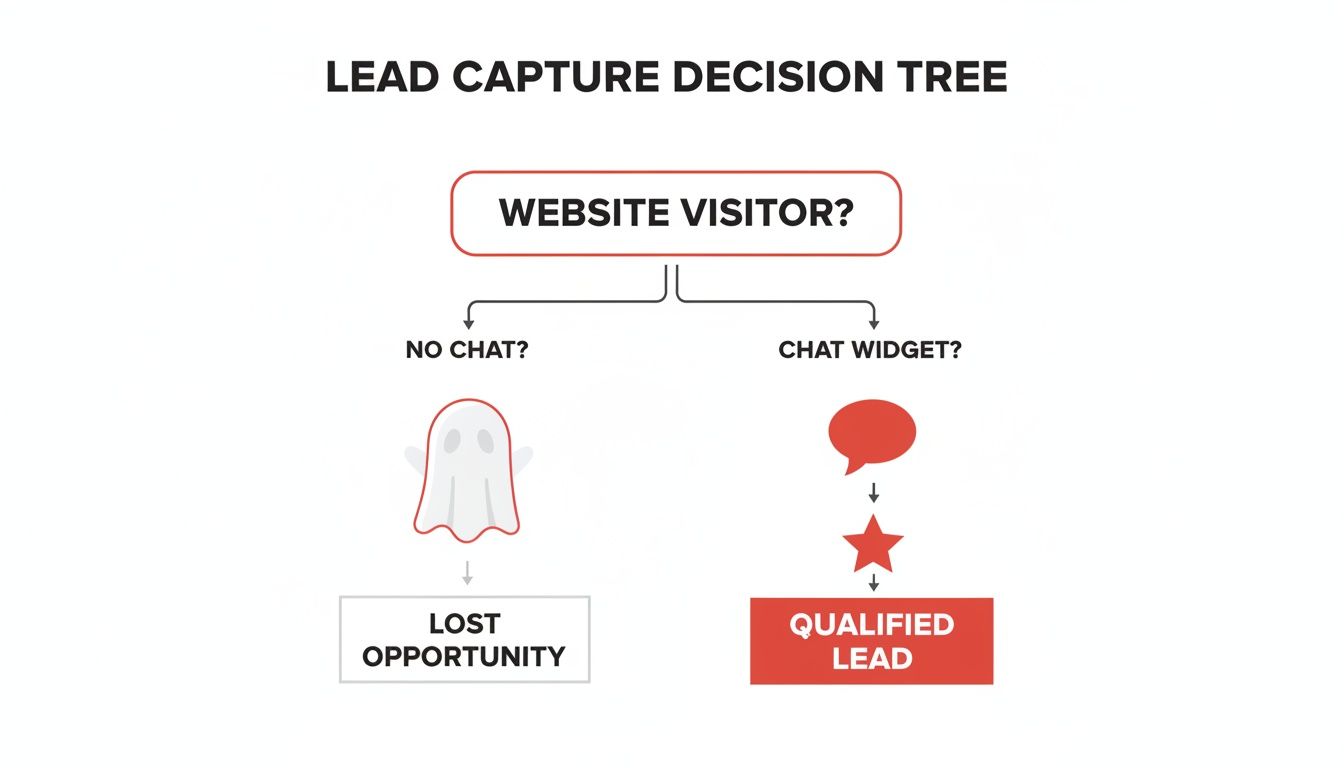
This decision tree clearly shows the two paths a website visitor can take. Without a chat tool, most visitors leave without a trace. With one, you open up a direct line for capturing and qualifying them on the spot.
Making The Smartest Choice
Ultimately, your business goals should steer your decision. If you have a huge, dedicated support team and want to offer real-time human chats, a live chat tool might be a good fit.
But for most businesses focused on growth, an AI assistant is far more efficient. It ensures every single visitor is engaged—day or night—and that your sales team’s calendar is filled with meetings from pre-qualified leads, not just random inquiries.
To see how different platforms compare in more detail, check out our in-depth live chat software comparison.
Setting Up Your Chat Widget in Minutes
If you’re thinking that adding new tech to your website is going to be a massive headache, I’ve got good news. Getting a modern chat widget on your website is surprisingly simple. Seriously, it often takes less time than making a pot of coffee.
The best part? You don’t need to be a coding genius. Most of these tools are built for business owners, not developers, and you usually have a few different ways to get it done.
Choose Your Installation Path
How you install the widget really just depends on what your website is built on. For the vast majority of businesses, it boils down to one of two dead-simple options.
One-Click Plugins: This is the golden ticket if your site is on WordPress, Shopify, or a similar platform. You just head to their app or plugin marketplace, search for your chat provider, and hit “Install” and “Activate.” That’s it. The plugin does all the heavy lifting for you.
Copy-and-Paste Code Snippet: Don’t let the word “code” scare you. Your chat provider will give you a small block of text—a JavaScript snippet. All you have to do is copy that text and paste it into a specific spot in your website’s settings, usually the header or footer.
Think of it like adding a Google Analytics tracking code. You don’t need to know how it works, just where to put it. It’s a one-time copy-and-paste job that connects your site to the chat service.
Connecting to Your Other Tools
Once the widget is live, the real magic begins when you connect it to the other software you’re already using. This part is usually optional, but I can’t recommend it enough for making your sales process smoother.
For example, you can set up an integration that automatically zaps new leads from your chat widget straight into your CRM. This is typically done with tools like Zapier or a direct API connection, which means your sales team gets hot leads instantly without anyone having to lift a finger for data entry.
Best Practices for a Chat Widget That Actually Converts
Simply dropping a chat widget onto your site is just the beginning. To turn that little icon in the corner into a genuine lead-generation machine, you have to be intentional about how it looks and what it says. It’s the difference between a tool that just sits there and one that actively works to bring in new business.
This really boils down to two things: how it looks (visual branding) and how it talks (conversational strategy). Nail these two, and you’ll create an experience that feels genuinely helpful, looks professional, and smoothly guides visitors toward becoming a lead.
Nail Your Visual Branding and First Impression
Before a visitor even thinks about typing, the widget’s appearance sends a signal. A generic, off-the-shelf chat box can feel a bit spammy or untrustworthy. But one that’s thoughtfully branded feels like a natural, helpful part of your website.
Here’s how to make that first impression count:
- Match Your Brand Colors: This is a simple but powerful touch. Use your company’s primary and secondary colors for the widget’s icon, header, and buttons. It creates instant visual harmony and reinforces who you are.
- Choose a Professional Avatar: Ditch the generic bot icons—they can make the interaction feel cold and robotic. Instead, use a clean, high-quality company logo or a friendly headshot of a real team member.
- Write a Compelling Welcome Message: Forget the bland “How can I help you?” and craft a message that sparks a conversation. Try something more specific to your business, like, “Hi there! Looking for a quick quote or have a question about our services?”
Define a Smart Conversational Strategy
Once you’ve got their attention, the conversation itself needs a plan. The goal isn’t just to make small talk; it’s to qualify potential leads without making them jump through hoops. This means designing a conversational flow that feels natural while gathering the essential info your sales team needs to take over.
A great chat widget doesn’t just answer questions—it asks the right ones. It acts as an intelligent filter, identifying high-potential leads so your team can focus its energy where it matters most.
Think about what makes someone a “qualified” lead for your business. For a local roofer, the crucial questions might be about project type, location, and timeline. For a SaaS company, the bot would need to ask about company size, current software stack, and key business goals.
To ensure your chat widget on a website effectively turns visitors into leads, it’s smart to apply broader conversion rate optimization best practices to your overall approach. As far back as 2022, 85% of businesses had already adopted live chat. Today, a well-optimized tool can deliver 60-70% faster resolutions simply because it looks the part and is always available.
By customizing both the look and the logic of your chat widget, you create a seamless experience that not only helps visitors but also consistently delivers high-quality, pre-qualified leads right into your pipeline.
Measuring Success with Metrics That Matter
So, you’ve added a chat widget on a website. That’s a great first step. But how can you be sure it’s actually pulling its weight? To really prove its value, you have to look past vanity metrics like total site visits and zero in on the numbers that directly affect your bottom line.
Tracking the right data shows you exactly what’s working and where you have opportunities to improve. Thankfully, modern chat platforms like LeadBlaze make this easy with clean, straightforward analytics dashboards. This means you can spend less time digging through chat logs and more time acting on real insights.
Key Chat Widget Metrics to Track
To get a complete picture of how your chat widget is performing, you only need to focus on a few core data points. These numbers tell a story about visitor engagement, team efficiency, and—most importantly—revenue.
Here are the essential metrics every business should be keeping an eye on:
- Conversation Volume: This is simply the total number of chats started. It’s a quick gut check to see if your widget is effectively grabbing visitors’ attention and getting them to engage.
- Lead Capture Rate: This is the percentage of all conversations that turn into a qualified lead. A high number here is a great sign that your widget is doing its job of identifying and collecting contact info from serious prospects.
- Chat-to-Lead Conversion Rate: Of all the leads your widget captures, how many actually become paying customers? This is the ultimate measure of ROI, drawing a straight line from your chat conversations to closed deals.
By tracking these specific KPIs, you shift from guesswork to a data-driven strategy. You can clearly see how your chat widget is feeding your sales pipeline and make smart decisions to fine-tune its performance over time.
A solid analytics dashboard is your best friend here. It gives you an at-a-glance view of your return on investment and helps you understand how tweaking a welcome message or changing a qualification question impacts your results.
For a deeper dive, our guide on how to measure customer experience offers even more strategies for tracking what truly matters. This knowledge lets you continuously refine your approach, making sure your chat widget becomes an indispensable tool for growth.
Got Questions About Website Chat Widgets? We Have Answers.
It’s smart to ask questions before adding any new tool to your website. You want to be sure it’s the right move. Let’s tackle some of the most common questions we hear from business owners about adding a chat widget.
We’ll keep the answers clear and straightforward so you can feel confident about your decision.
Will a Chat Widget Slow Down My Website?
This is probably the number one concern we hear, and it’s a good one. The short answer? No, it shouldn’t.
Modern chat widgets are designed to be incredibly lightweight. They use a method called asynchronous loading, which means the widget loads independently of your main website content. Think of it like a YouTube video embedded in a blog post—the rest of the page loads first, and the video loads on its own time without holding everything else up. This keeps your site zippy and your user experience smooth.
Do I Need to Be Available 24/7 to Answer Chats?
Absolutely not. This is precisely where an AI-powered widget blows traditional live chat out of the water. Live chat tethers a real person to a screen, but an AI sales assistant is built to work around the clock.
The real magic of AI is that it delivers 24/7 service without needing 24/7 staffing. It engages visitors, qualifies leads, and captures their information while you’re sleeping. You literally won’t miss another opportunity.
How Much Does a Chat Widget Cost?
The cost can be all over the map, depending on the tool you choose. Old-school live chat platforms usually charge per “seat” or per agent, which gets pricey fast as your team expands. Some of the rule-based chatbot builders have confusing pricing tiers that are almost impossible to predict month-to-month.
A better approach, and the one we take at LeadBlaze, is a simple, flat-rate monthly subscription. You get unlimited conversations and team members, making it a predictable, affordable investment that scales with your business, not your bills.
Can the Chat Widget Integrate with My CRM?
Yes, and it should. Any serious chat widget solution is built to play nicely with the other tools in your sales and marketing stack. Look for direct integrations with popular CRMs and marketing automation platforms.
This connection is what makes the whole system work. It automatically sends qualified leads and their chat history straight into your sales pipeline, so your team can follow up instantly. No more manual data entry, no more copy-pasting, and no more leads falling through the cracks.
Ready to see how an AI sales assistant can change the way you generate leads? LeadBlaze offers a simple, powerful chat widget you can have up and running in minutes. Start engaging every visitor, 24/7, and get qualified leads sent right to your team. Explore LeadBlaze and start your 7-day free trial today.