A potential customer lands on your website, knows what they need, and wants a quick answer before reaching out. They click around, hit a stiff contact form, and see fields that feel like paperwork. Name, email, phone, message. No guidance. No instant response. No sense that anyone is there.
So they leave.
That leak happens every day on small business websites. Not because the offer is weak, but because the buying experience is cold at the exact moment interest is highest. A visitor who would happily answer two or three simple questions in a chat window often won’t stop to fill out a generic form and wait.
That gap is why business messaging platforms matter. They aren’t just communication software. Used well, they’re the front door for lead capture, qualification, follow-up, and support.
Why Your Website Is Leaking Customers
A plumbing company gets a visitor at 9:14 p.m. The visitor has a real problem, wants someone local, and is ready to book. The website loads quickly, the services are clear, and the reviews look solid. Then the only call to action is a contact form with a promise that someone will respond tomorrow.
By morning, that visitor has already contacted a competitor.
This is the most common website conversion problem I see. Businesses spend money to earn the click, then force high-intent visitors into a low-energy experience. Static forms ask for effort before giving value. Messaging does the reverse. It gives the visitor momentum.
The timing matters because customer behavior has already shifted. Over 3 billion people actively use messaging apps worldwide, which means the habit of asking quick questions through chat is already built into everyday life, not something your customers need to learn from scratch, according to Business of Apps’ messaging app market data.
The conversational gap
A lot of websites still behave like digital brochures. They display information but don’t help the visitor move forward. If someone wants to ask, “Do you serve my area?” or “Can you handle this insurance?” or “What’s your earliest appointment?”, they shouldn’t have to compose an email to get there.
That’s why a well-placed chat widget on your website often changes the quality of inbound leads. It turns a passive visit into an active conversation.
Practical rule: If a buyer has to wait to ask a simple question, you’re making the sale harder than it needs to be.
What works and what doesn’t
What works is simple. Give visitors a fast path to ask, answer, and advance. Let them get clarity before commitment.
What doesn’t work is treating every lead the same. Someone with urgent buying intent shouldn’t enter the same queue as someone casually browsing. Business messaging platforms help you separate those two groups while the visitor is still engaged.
Understanding Business Messaging Platforms
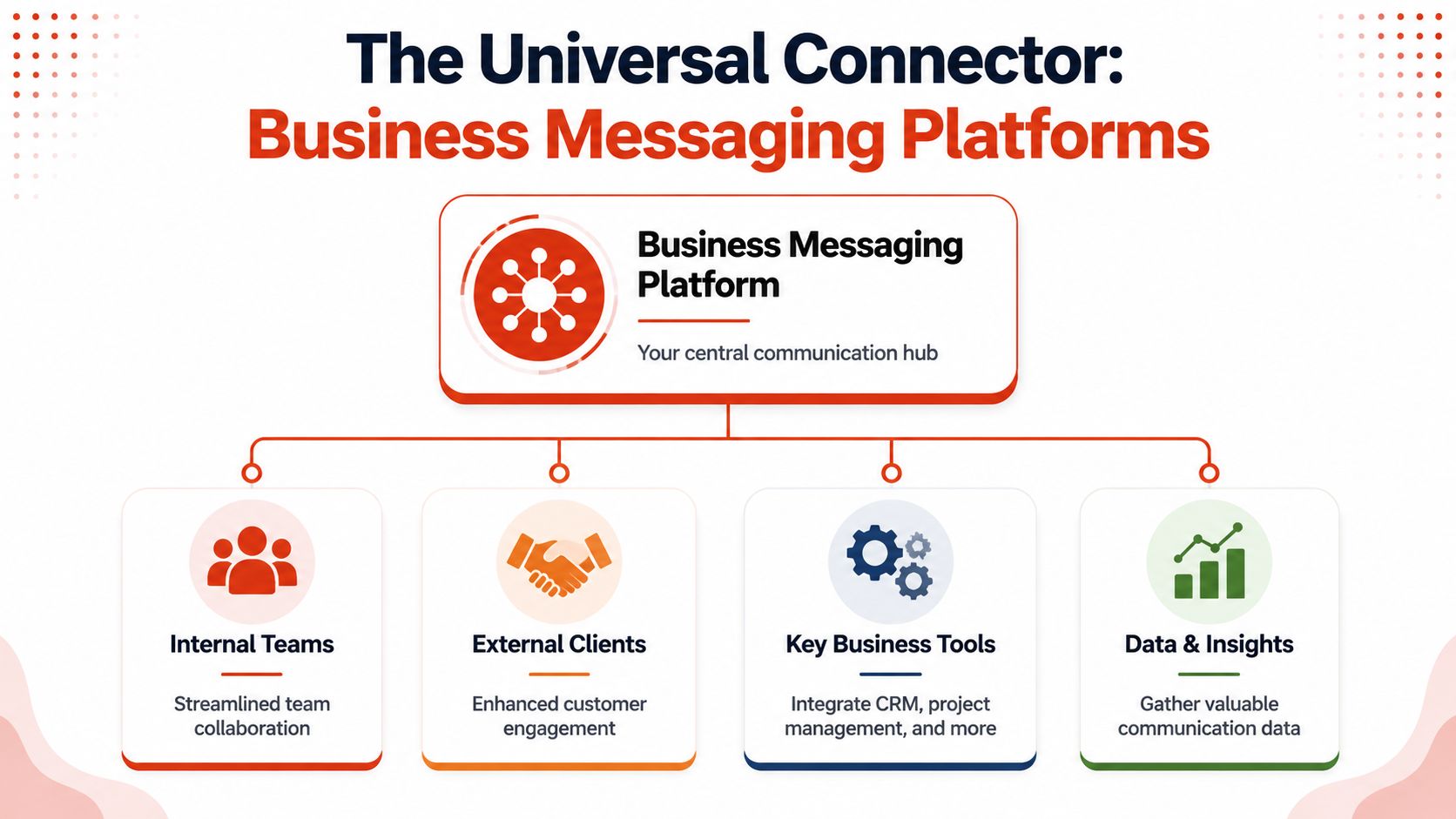
A business messaging platform is a universal remote for customer conversations. Instead of juggling separate tools for website chat, SMS, WhatsApp, Messenger, and internal follow-up, your team works from one control center. One inbox. One conversation history. One place to route, tag, assign, and respond.
That matters because scattered conversations create expensive confusion. Sales has one thread in text, support has another in email, and nobody sees the full picture. A unified platform gives the team context instead of fragments.
One hub instead of five tabs
The strongest business messaging platforms do three jobs at once:
- They centralize channels so your team isn’t bouncing between apps.
- They preserve context so a conversation can move from web chat to SMS without starting over.
- They connect with business systems like a CRM, booking tool, or help desk.
For a small business, this isn’t about fancy architecture. It’s about not losing the thread. If a prospect starts on your site, asks a follow-up by text, and then gets handed to sales, the team should see one journey, not three disconnected messages.
Why this category keeps growing
Businesses aren’t treating messaging like a side tool anymore. They’re treating it like operating infrastructure. Zion Market Research says the global messaging platform market was valued at USD 62.91 billion in 2024 and is projected to reach USD 114.17 billion by 2034, with a projected 5.7% CAGR from 2025 to 2034, according to its messaging platform market report.
That growth makes sense. Messaging now sits in the middle of sales, support, reminders, customer updates, and post-sale service. It’s not just internal chat software.
If you’re sorting through platform categories, it’s useful to compare broader enterprise approaches too. This guide to CartBoss enterprise messaging gives a helpful view of how larger messaging systems are structured, even if your actual need is simpler and more lead-focused.
A messaging platform should reduce operational drag. If it creates more tabs, more handoffs, or more manual copying, it’s solving the wrong problem.
Comparing Your Core Messaging Channels
Not every messaging channel does the same job. As a result, businesses get sloppy. They add a chat widget, send a few texts, maybe run email automations, and assume they’ve built a communication system. They haven’t. They’ve collected channels.
The right stack depends on where the conversation starts, how urgent it is, and what action you want next.
Messaging channel comparison
| Channel | Best For | Immediacy | Key Consideration |
|---|---|---|---|
| Web chat | Capturing inbound website intent | High | Best when tied to qualification logic and team handoff |
| SMS | Follow-ups, reminders, time-sensitive replies | High | Strong visibility, but should feel relevant and permission-based |
| WhatsApp or Messenger | Conversational support and familiar app-based engagement | High | Useful when customers already expect to interact on those apps |
| Automated email | Nurture, recap, longer-form follow-up | Medium | Better for depth and documentation than instant back-and-forth |
Web chat for first-contact lead capture
Web chat is the fastest way to intercept intent on your own site. It works best when a visitor is evaluating, comparing, or trying to verify fit. A good web chat flow asks a few smart questions and routes based on the answers. A bad one just says, "How can we help?" and waits.
That difference matters. Open-ended chat can create noise. Guided chat creates qualified leads.
SMS for visibility and momentum
SMS is hard to ignore. That's useful when you need to confirm interest, reschedule, answer a quick question, or bring a stalled lead back into motion. It's especially effective after a website conversation because the buyer has already shown intent.
The mistake is using SMS as a blunt instrument. If every text reads like a campaign blast, people tune out. It should feel like a continuation of a real exchange.
WhatsApp and Messenger for customer comfort
Some audiences naturally prefer app-based messaging. If your customers already use WhatsApp or Messenger in daily life, these channels can lower friction. They feel familiar, which helps conversations start faster and continue more naturally.
Sendbird notes that leading platforms now prioritize omnichannel capabilities, allowing teams to manage SMS, in-app messages, and WhatsApp from a single system, according to its overview of business text messaging apps and omnichannel messaging. Achieving this unified management is the goal. Not more channels for their own sake, but one operating layer behind them.
Email still matters, just not for everything
Email is still useful. It's just slower and easier to postpone. I like it for summaries, estimates, onboarding details, and nurture sequences that need more room than a text message allows.
If you're refining that part of your stack, this in-depth email marketing guide is a solid resource for thinking through email's role alongside faster messaging channels.
The best channel is usually the one that matches the buyer's urgency. Use chat for in-the-moment intent, SMS for follow-through, app messaging for convenience, and email for detail.
The practical stack for most SMBs
For many SMBs, the cleanest setup is:
- Web chat first for capturing and qualifying demand on-site
- SMS second for high-visibility follow-up
- WhatsApp or Messenger when your audience already prefers them
- Email for longer summaries, proposals, and nurture
What doesn't work is forcing every interaction into one channel because it's easier for the business. Buyers care about convenience. Your system should adapt to that, while your platform keeps the data organized behind the scenes.
Essential Features That Drive Business Results
Feature lists can get noisy fast. Most platforms advertise inboxes, bots, analytics, workflows, and integrations. The question isn't whether those features exist. It's whether they help your team capture revenue and respond cleanly.
Unified inbox and routing
A unified inbox is your command center. It lets one team manage inbound conversations without guessing where messages landed. For a small business, that means fewer missed leads. For an agency, it means account managers can see what happened without logging into a pile of separate tools.
Routing matters just as much. A new lead shouldn't sit in the same queue as a support question about an invoice. Good platforms let you assign based on intent, service type, location, or urgency.
Automation that qualifies instead of stalls
Automation helps when it moves the buyer forward. It hurts when it blocks simple progress.
Here are the automation features that usually pay off:
- Qualification prompts that ask useful questions early, like service need, timeline, or location
- Availability workflows that move a prospect toward booking or callback
- Follow-up triggers that continue the conversation when a visitor leaves midstream
- Handoffs to humans when the question gets specific or high-value
A rule-based bot that traps visitors in canned choices often kills momentum. An effective workflow feels like a receptionist who knows what to ask and when to stop talking.
CRM sync and analytics
A messaging platform should pass clean data into your CRM or lead management process. Not just a transcript. You want contact details, source, qualification answers, timestamps, and ownership.
Analytics matter too, but only if they're tied to operational decisions. Track which entry points create conversations, which questions cause drop-off, and which handoffs lead to booked calls or closed deals.
One platform that fits this lead-capture use case is LeadBlaze, which uses website conversations to answer questions, collect qualification details, and produce concise lead summaries rather than long chat logs. That model is useful when teams need clarity fast and don't want to dig through transcripts before calling a lead.
Putting Messaging to Work with Key Use Cases
Most articles about business messaging platforms drift toward internal collaboration. That's useful if you're comparing Slack against Teams. It doesn't help much if you're trying to turn website traffic into booked jobs, consults, estimates, or sales calls.
The commercial value shows up when messaging changes the buyer's next step.
Qualifying inbound leads while they're still engaged
A visitor lands on a home services site and wants to know whether the company handles their exact issue. Instead of reading five service pages and guessing, they start a chat. The platform asks what they need, where they're located, and how soon they want help. If the answers fit the business, the conversation gets flagged for rapid follow-up.
That's the part many SMBs miss. Qualification shouldn't begin after the lead form is submitted. It should begin during the first interaction. RingCentral highlights this gap well, noting that while many guides focus on internal collaboration, the bigger SMB opportunity is inbound qualification. It also cites a Meta-commissioned poll in which 75% of adults want business communication to feel personal and conversational, as discussed in its article on business unified messaging platforms.
If you're building that kind of flow on your site, a chatbot for website lead capture gives you a practical model to work from.
Fast support that protects revenue
Support isn't just a service function. It's a sales protection function.
When a customer can't get an answer about delivery, availability, insurance coverage, or setup, friction rises. Messaging lets your team resolve that concern in the same session instead of sending the customer into a support void. That reduces drop-off at moments that often kill conversion.
Businesses don't lose deals only because of price. They lose deals because unanswered questions create doubt.
Appointment booking and reactivation
Local businesses benefit from messaging when the workflow is simple and time-sensitive. Clinics, contractors, med spas, agencies, and legal practices all deal with leads who want answers before they commit.
Useful patterns include:
- Booking conversations that collect enough information to place the prospect with the right provider
- Reminder messages that cut down on manual outreach
- Cold lead reactivation when someone asked about a service but didn't schedule
- Post-quote follow-up to pull a prospect back into the pipeline
The strongest use cases all share one trait. The conversation doesn't stop at "Thanks, we'll be in touch." It advances toward a real business outcome.
The Rise of AI Assistants in Business Messaging
Basic chatbots used to act like phone trees. Pick an option. Get a canned answer. Hit a dead end if your question didn't fit the script.
Modern AI assistants are different. They work more like a smart front-desk person who can understand what the visitor is asking, respond in natural language, and keep the conversation organized for the team.

From scripted flows to useful conversations
The shift isn't just technical. It's operational.
A rigid bot usually creates one of two problems. It either asks too few questions and sends junk leads to the team, or it asks too many scripted questions and pushes buyers away. AI assistants can handle more natural replies, clarify intent, and keep context across multiple turns.
That's especially valuable when visitors ask messy real-world questions like:
- Do you serve my suburb if the job is commercial?
- Can you work around our clinic hours?
- What's included in this package versus the other one?
Those aren't hard for a human. Old bots struggled with them. AI closes that gap.
For a broader look at where this category is going, this guide on AI customer service from Recepta.ai is useful background.
What teams should expect from AI now
The practical win is not just that AI replies faster. It's that AI can clean up the handoff.
A strong system should summarize the conversation, highlight intent, and extract the details your team needs. That's a better outcome than dumping a long transcript into someone's inbox and expecting them to piece it together.
If you're evaluating this approach for sales workflows, conversational AI for sales is the right lens. The goal isn't to sound futuristic. The goal is to make lead handling more accurate, more immediate, and less manual.
A quick walkthrough helps make that difference concrete:
How to Choose and Implement Your Platform
Choosing a platform gets easier when you stop asking, "Which tool has the most features?" and start asking, "Which tool fits how we capture, qualify, and respond?" Most SMBs don't need a giant communication suite. They need a reliable system that helps staff answer faster, route smarter, and preserve context.
What to check before you buy
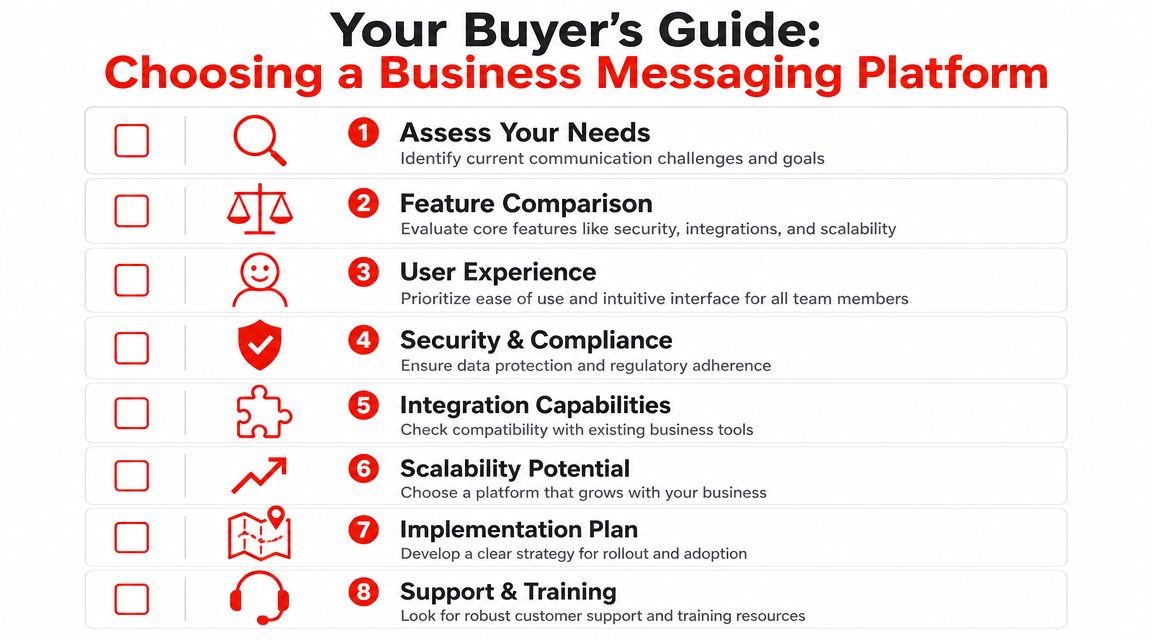
Use this checklist when comparing business messaging platforms:
- Channel fit: Does it support the channels your customers already use?
- Inbox usability: Can your team reply, assign, and search without extra friction?
- Qualification control: Can you shape the questions, workflows, and routing logic?
- Integration path: Will it connect cleanly to your CRM, calendar, or booking stack?
- Automation quality: Does automation help buyers move forward, or just deflect them?
- Reporting clarity: Can you see conversation outcomes, not just message volume?
- Admin controls: Can you manage roles, access, and team visibility without workarounds?
- Conversation record: Will the platform preserve a usable history for follow-up and accountability?
That last point matters more than many SMBs realize. LeapXpert emphasizes that enterprise-grade messaging is judged on its ability to maintain a complete, compliant record of customer conversations, including a durable system of record that supports governance and traceability, as covered in its guide to business messaging apps for compliance and recordkeeping.
A simple rollout plan
Don't overbuild the first version. Start with one clear workflow and get it right.
-
Choose the main job first
Pick one outcome. Lead qualification, appointment booking, or support triage. -
Select the entry channels
Start where customer intent is strongest. For many SMBs, that's website chat first and SMS second. -
Build the first conversation path
Ask only what helps your team act. If a question won't change routing or follow-up, remove it. -
Train for handoff, not just response
Your team should know when to jump in, what context to review, and how to continue the conversation without repeating what the customer already said.
Buyer test: If your staff needs a separate document to explain how to use the inbox, the platform is probably too clunky for day-to-day speed.
The best implementation is rarely the most complex one. It's the one your team uses, your customers don't notice as a system, and your pipeline benefits from immediately.
If your website is still relying on cold forms to collect warm demand, LeadBlaze gives you a practical way to change that. It adds an AI sales assistant to your site, answers visitor questions, collects qualification details, and summarizes conversations for your team so you can focus on follow-up instead of transcript cleanup.