Lead generation chatbots are basically 24/7 AI assistants working on your website. They pop up to chat with visitors in real-time, aiming to capture their contact info and figure out if they’re a good fit for your business. Instead of just sitting there like a static form, these bots actively start conversations, turning anonymous website traffic into actual, sales-ready leads.
Moving From Static Forms To Smart Conversations

Think of your website as a physical store. A traditional “Contact Us” form is like leaving a suggestion box on an empty counter. You’re just hoping someone bothers to stop, find a pen, and fill out a card. It’s a passive approach that creates a lot of work for the visitor and just doesn’t meet today’s demand for instant answers.
A lead generation chatbot, on the other hand, is like having a friendly, skilled concierge greet everyone at the door. It welcomes visitors, asks what they need, and points them in the right direction. This one change can transform your website from a static brochure into a powerful, interactive sales tool.
The Problem With Passive Data Collection
Let’s be honest, people today expect instant gratification. When they have a question, they want an answer now, not in a few hours or—even worse—the next business day. Static forms introduce a huge delay, and that’s when high-intent visitors lose interest and bounce, often heading straight to a competitor who can help them immediately.
This friction creates a leaky sales funnel and a lot of missed opportunities. Every person who leaves your site without talking to you is a potential lead you’ve lost for good. To really get why smart conversations are so crucial, it helps to understand the bigger picture of what is lead generation marketing.
The core issue with forms is they put all the work on the customer. A chatbot flips this dynamic by initiating the conversation, making it easier for visitors to get help and for you to get a lead.
To see just how different the two approaches are, let’s compare them side-by-side.
Static Forms vs Lead Generation Chatbots
| Feature | Static Web Forms | Lead Generation Chatbots |
|---|---|---|
| Engagement | Passive; waits for user input. | Proactive; initiates conversation. |
| Response Time | Delayed; requires manual follow-up. | Instant; provides 24/7 answers. |
| User Experience | Impersonal and transactional. | Interactive and conversational. |
| Qualification | None; all entries are treated the same. | Automatic; pre-qualifies leads in real-time. |
| Data Collection | All at once; can feel overwhelming. | Progressive; asks questions one by one. |
This table makes it pretty clear. Chatbots are built to engage, while forms are built to simply collect.
Embracing Proactive Engagement
Lead generation chatbots are designed specifically to fix this problem by being proactive. They don’t just sit around waiting for a visitor to make the first move. Instead, a good chatbot can:
- Greet visitors with a personalized welcome message.
- Ask qualifying questions to learn about their needs, budget, and timeline.
- Provide instant answers to frequently asked questions, any time of day.
- Schedule demos or appointments right inside the chat window.
Over the past decade, chatbots have gone from being a quirky website add-on to an essential business tool. The data backs this up: modern bots can generate 391% more engagements than old-school static forms simply because they start the dialogue. Even better, 55% of businesses using chatbots say they’re getting more high-quality leads, since the bots can screen prospects before ever sending them to the sales team.
By making your website a more interactive experience with a well-designed chat widget on your website, you not only meet your customers’ expectations but also build a much more efficient and effective sales pipeline.
How Chatbots Actually Qualify Your Leads
You don’t need to be a tech wizard to understand how a chatbot turns a casual website visitor into a genuine sales opportunity. At its heart, a chatbot is like a super-efficient gatekeeper for your website, sorting through all the traffic to pinpoint the people who are most likely to buy.
This isn’t just a random pop-up. It’s a smart, calculated process of engaging visitors, capturing key details, and then filtering them based on logic you define.
Think of it like a seasoned salesperson at a trade show. They don’t launch into a full product demo for every single person who walks by their booth. Instead, they start with a few smart, quick questions to figure out who’s a serious prospect. A chatbot does the exact same thing—but it does it for every visitor, instantly, around the clock.
It all kicks off with an engagement trigger.
Starting The Conversation With Triggers
A chatbot doesn’t just show up unannounced. Its appearance is timed perfectly, triggered by specific actions a visitor takes that signal they might be interested. These digital tripwires make sure the bot pops up at the right moment, offering help without being annoying.
Here are some of the most common triggers:
- Time on Page: The bot can appear after someone spends, say, 30 seconds on a key page like your pricing or services list. This tells you they’re actively looking into what you offer.
- Exit-Intent: Just as a visitor’s cursor heads for the ‘X’ to close the tab, the bot can jump in with a last-minute offer or a helpful question. It’s a great way to stop a potential lead from bouncing.
- Scroll Depth: If someone scrolls 75% of the way down a long blog post or landing page, they’re clearly engaged. That’s the perfect time for a chatbot to offer more info or ask if they have questions.
- Specific Button Click: A visitor clicks “Request a Demo”? A chatbot can instantly start the scheduling process right then and there.
Once the conversation starts, the chatbot guides the user through a pre-planned conversational flow. This is where the real qualification magic happens.
Capturing Data And Applying Logic
This conversational flow is the brain of the operation. It’s basically a branching script that changes based on how the user responds. Instead of hitting someone with a long, daunting form, the bot asks for information one piece at a time. It feels less like an interrogation and more like a helpful chat.
First, it grabs the essentials, like a name and email. Then it moves on to the really important qualification questions—the ones that separate the window shoppers from the serious buyers. The whole point is to gather just enough information to decide if this person is a good fit for your sales team. To get a better handle on this, check out our guide on what is a qualified lead in sales.
The goal of a chatbot’s qualification logic is to filter signals from noise. By asking targeted questions, it identifies visitors who match your ideal customer profile and flags them for immediate follow-up.
This filtering all comes down to rules you set up beforehand. For example, you might decide a “hot lead” is anyone with a budget over $5,000 and a timeline of less than three months. When the chatbot finds someone who fits that description, it can automatically route them to a live sales agent or let them book a meeting on the spot.
To really get this right, you need to master your lead qualification process and understand all the steps involved.
Ultimately, the chatbot acts as your intelligent front line, making sure your sales team’s calendar is packed with conversations that have a real shot at closing.
Essential Features That Drive Conversions
Not all lead generation chatbots are built the same. A basic chat widget might answer a few simple questions, but a truly effective one is a purpose-built engine designed to turn casual website visitors into qualified leads. It’s the difference between a standard sedan and a Formula 1 car—both will get you down the road, but only one is engineered to win the race.
The right features work in harmony to create a smooth, engaging experience that captures information, qualifies a prospect’s intent, and delivers real business results. These are the non-negotiables that separate a simple pop-up from a genuine revenue-generating asset.
Proactive Messaging That Starts the Conversation
First and foremost, a great lead-gen bot has to be proactive. A chatbot that just sits quietly in the corner of your site waiting for someone to click is no better than a static contact form. A smart bot, on the other hand, initiates conversations based on what a visitor is doing, much like a helpful store associate who spots a customer looking intently at a specific product.
This is usually handled with custom triggers you can set up:
- Time on Page: Greet a visitor after they’ve spent 30 seconds on your pricing page. That’s a strong signal they’re seriously considering what you offer.
- Exit-Intent: Just as their mouse moves to close the tab, the bot can pop up with a last-chance offer: “Before you go, can I answer any questions about our services?”
- Scroll Depth: Engage someone after they’ve scrolled 70% of the way down a long case study. You know they’re highly invested in the content at that point.
This proactive approach makes your website feel alive and instantly boosts the number of conversations you can have.
Custom Qualification Rules
Once the chat is rolling, the bot’s next job is to be an intelligent filter. This is where custom qualification rules are critical. You can program your bot to ask specific, targeted questions that separate the high-potential prospects from the tire-kickers, making sure your sales team only spends time on leads that actually matter.
For instance, a marketing agency could set up rules to ask about:
- Budget: “What’s your approximate monthly budget for this project? ($1k-$5k, $5k-$10k, $10k+)”
- Timeline: “How soon are you looking to get started? (Immediately, Within 3 months, 3-6 months)”
- Needs: “Which of our services are you most interested in? (SEO, PPC Ads, Web Design)”
Based on the replies, the bot can instantly identify a “hot lead” and take the right next step, whether that’s scheduling a demo or connecting them to a live person right away.
A chatbot with solid qualification logic acts as your digital gatekeeper. It works 24/7 to make sure every lead passed to sales has been properly vetted, saving your team countless hours of manual sifting.
Seamless CRM and Tool Integrations
A lead generation chatbot can’t be an island. To be truly powerful, it has to connect seamlessly with the other tools you rely on every day, especially your Customer Relationship Management (CRM) system.
When a chatbot captures a lead, a good integration can automatically:
- Create a new contact in your CRM, like HubSpot or Salesforce.
- Log the entire conversation transcript right on the contact’s record.
- Update a deal pipeline or assign the new lead to a specific salesperson.
This automation gets rid of tedious data entry, stops leads from falling through the cracks, and gives your sales team the full story before they even pick up the phone. The difference between a simple pop-up and a fully integrated tool is significant; for a deeper dive, you might find value in this comprehensive live chat software comparison.
Intelligent Appointment Scheduling
Finally, one of the most powerful features for driving conversions is automated appointment scheduling. Forget the endless email back-and-forth trying to find a meeting time. A good chatbot can book demos, consultations, or initial calls directly within the chat window.
By connecting to your team’s calendars (like Google Calendar or Calendly), the bot can show a prospect your real-time availability. They pick a slot that works for them, get an instant calendar invite, and are all set for the meeting—no human intervention required. This simple step removes a huge point of friction in the sales process, shortens the sales cycle, and can increase booked meetings by over 30%.
Your Step-By-Step Chatbot Implementation Guide
Setting up a lead generation chatbot on your website might feel like a huge technical hurdle, but it’s honestly much easier than it looks. Modern tools like LeadBlaze are built for business owners, not developers. What used to take weeks of coding can now be done in under an hour.
Think of it like putting together IKEA furniture. You get a clear set of instructions, and if you follow them step-by-step, you end up with a solid, useful tool. This guide is your instruction manual, helping you launch with confidence and start pulling in new leads right away.
Stage 1: Define Your Primary Goal
Before you even think about what your chatbot will say, you need to decide what you want it to do. A bot without a clear goal is just a glorified pop-up. This one decision shapes every question it asks and every path it offers, so it’s the most important first step.
What are you trying to accomplish?
- Book more sales demos? Then the bot’s mission is to qualify prospects and get them straight onto your calendar.
- Grow your email list? The entire conversation will be geared toward offering something valuable in exchange for their email.
- Separate sales leads from support tickets? The bot will act like a virtual receptionist, directing people to the right department.
Pick just one primary goal to start. You can always get fancier later, but starting with a single, measurable objective—like “Book five qualified meetings per week”—makes building the bot and measuring its success a whole lot simpler.
Stage 2: Craft Your Conversation Flow
Okay, goal set. Now it’s time to map out the actual conversation. This is the script your bot will follow to guide a visitor from “Hello” to the finish line. Keep it simple. A short, direct path always beats a long, confusing maze.
A solid conversation flow for a lead-gen bot usually follows this pattern:
- The Opener: A friendly, proactive welcome that offers to help.
- Initial Questions: Start with the basics, like asking for their name to make the chat feel more personal.
- Qualification Questions: This is where you dig in to find out if they’re a good fit (think budget, timeline, specific needs).
- The Call-to-Action: Based on their answers, the bot will book that meeting, capture their email, or point them to a helpful resource.
- The Handoff: If they’re a red-hot lead, the bot can transfer them directly to a live sales agent.
This process map shows how all the pieces—from the first message to CRM integration and scheduling—work together seamlessly.
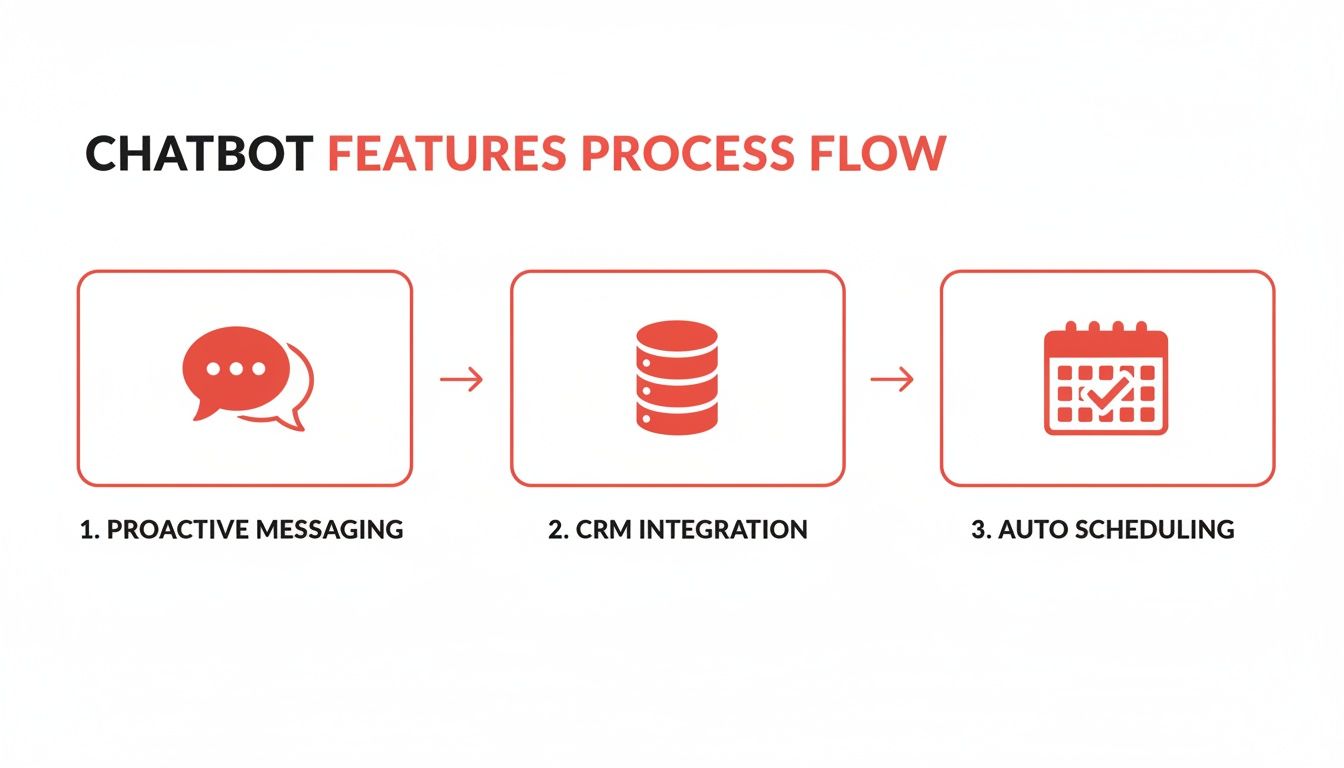
Think of it as an automated journey for the top of your funnel, taking visitors from their first click to a confirmed appointment without any manual effort on your part.
Stage 3: Establish Your Qualification Rules
This is where the magic happens. Qualification rules are the “if-then” logic that makes your chatbot smart. These rules are your automated gatekeeper, making sure your sales team only talks to people who are actually a good fit for your business.
Qualification rules turn your chatbot from a simple message-taker into a strategic sales assistant. You define what a “good lead” looks like, and the bot does the filtering for you in real time.
For a local contractor, the rules might look something like this:
- If a visitor’s project budget is over $10,000, then mark them as a “Hot Lead” and immediately offer to schedule a call.
- If their timeline is “within the next month,” then assign them a high priority and send a notification to the sales team.
- If they are located outside your service area, then politely let them know and maybe even offer a referral.
Just a few simple rules like these can save you countless hours by weeding out the tire-kickers automatically.
Stage 4: Install and Test Your Chatbot
Time to get this thing live! The “technical” part is actually the easiest. Most chatbot platforms just require you to copy a small snippet of code and paste it onto your website. If you’re on WordPress, it’s often as simple as installing a plugin.
Once it’s installed, you absolutely must test it. Don’t just publish it and hope for the best. Run through the entire conversation yourself.
- Pretend you’re the perfect customer.
- Pretend you’re a bad fit with a tiny budget.
- Try to break it with weird answers.
This is your final quality check. It helps you find awkward sentences, broken logic, or any little bugs before a real prospect does. A few minutes of testing ensures everyone who interacts with your bot has a smooth, professional experience.
To bring it all together, here’s a simple checklist to guide you through the process.
Your 5-Step Chatbot Implementation Checklist
This checklist breaks down the entire setup process into five clear, manageable actions. Follow these steps to ensure a smooth launch from start to finish.
| Step | Action Item | Key Consideration |
|---|---|---|
| 1. Define Goal | Choose one primary objective (e.g., book demos, capture emails). | Your goal will dictate the entire conversation flow and success metrics. |
| 2. Design Flow | Map out the conversation script from greeting to call-to-action. | Keep it simple and focused. Don’t ask for more information than you need. |
| 3. Set Rules | Establish the “if-then” logic for lead qualification. | Define what makes a lead “hot” vs. “cold” (e.g., budget, timeline, location). |
| 4. Install & Test | Add the chatbot script to your website and run multiple tests. | Test every possible conversation path to find and fix any issues before going live. |
| 5. Integrate | Connect the chatbot to your CRM, calendar, and email tools. | Automation is key. Ensure new leads are automatically sent to the right systems. |
By working through this checklist, you’re not just building a chatbot; you’re building a reliable system for generating qualified leads around the clock.
Fine-Tuning Your Chatbot for Peak Performance
Getting a lead generation chatbot live on your site is a great first step, but the real magic happens in the fine-tuning. Think of it like a race car—it’s not enough to just build it; you have to constantly adjust it to get the best possible lap times. Small, strategic tweaks to your chatbot can lead to massive gains in both lead quality and overall engagement.
It all starts with that first “hello.” The opening message is your one chance to hook a visitor and pull them into a conversation. A bland, generic “How can I help you?” is the digital equivalent of a lazy handshake—it’s easily forgettable and often ignored.
Instead, you need a proactive opener that speaks directly to what the visitor is doing right now. For example, if someone is lingering on your pricing page, a message like, “Trying to find the right fit? I can help you compare plans in under 60 seconds,” is way more effective. It shows you understand their goal and offers a quick, valuable solution.
Give Your Bot Some Personality
Let’s be honest, no one enjoys talking to a robot that sounds like a robot. A sterile, lifeless chatbot is just a slightly more interactive version of a boring form. To get people to actually engage, you need to give your chatbot a personality that reflects your brand.
Are you a fun, quirky B2C brand? Let your bot use some emojis and a more casual tone. A high-end B2B consultancy? Keep the language professional, direct, and efficient. This personality needs to be consistent from the first message to the last, making the chat feel less like an interrogation and more like a helpful conversation. It’s a simple change, but it makes a world of difference in getting visitors to open up.
The best lead gen chatbots don’t just ask questions; they build a connection. A distinct personality turns a data-collection task into a positive brand interaction, warming up prospects for the next step.
Keep it Short, Sweet, and to the Point
Your visitors are busy. You have to respect their time. While it’s tempting to grill every visitor with a long list of qualifying questions, you’ll just end up with a high drop-off rate. The goal here is speed and efficiency—get the bare minimum information you need to qualify the lead and pass them along.
Think of it as a three-step dance:
- The Hook: A strong, contextual opening line.
- The Essentials: Just 2-3 make-or-break qualifying questions (think budget, company size, or main pain point).
- The Handoff: A clear call-to-action, like booking a call or getting their email for a follow-up.
Every part of the conversation should feel quick and easy. If you can get a lead qualified in under 60 seconds, you’re doing it right. You’ll keep them engaged and move them down the funnel before they have a chance to get distracted.
Nail the Human Handoff
Automation is great, but you have to know when to get a real person involved. The transition from chatbot to a live sales rep—the human handoff—has to be absolutely seamless. There’s nothing more frustrating for a hot lead than getting stuck in a robotic loop when they’re ready to talk business.
Set up smart triggers that automatically flag a lead for a human. For instance, if a prospect mentions a budget over a certain amount or asks a complex question the bot can’t handle, it should immediately offer a live connection. The bot needs to set clear expectations, too: “Great, thanks for that info. Let me get you over to a specialist who can dig into the details. They’ll be with you in just a moment.” This simple step makes the whole experience feel professional and ensures you capture high-intent leads the second they appear.
Always Be Testing
Finally, don’t ever “set it and forget it.” Your first draft is almost never your best one. The real secret to a high-performing chatbot is relentless A/B testing. You should constantly be running small experiments to see what works best for your specific audience.
Here are a few ideas to get you started:
- Opening Lines: Pit a direct question against a friendly statement.
- Button Text: Does “Book a Demo” outperform “Grab a Time to Chat”?
- Question Order: See if asking about their biggest challenge before asking for their email improves conversions.
By digging into the data from these tests, you can make smart, evidence-based tweaks that will continuously boost your chatbot’s performance over time.
Key Metrics For Measuring Chatbot Success
Putting a lead generation chatbot on your site is the easy part. Proving it’s actually pulling its weight? That’s another story entirely. Without the right data, your chatbot is just a fancy widget. To show its value and make smart improvements, you need to track a few key performance indicators (KPIs) that tie its activity directly to real business results.
Think of these metrics as your chatbot’s report card. They tell you what it’s doing well, where it’s fumbling, and exactly how it’s contributing to your bottom line. Monitoring these numbers helps you move from guesswork to a data-backed strategy, making your bot a more powerful sales tool over time.
Core Performance Metrics
To get a clear picture of your chatbot’s effectiveness, start by focusing on three essential metrics. These KPIs give you a bird’s-eye view of how visitors are interacting with your bot and whether those chats are turning into genuine opportunities.
Engagement Rate: This is the percentage of your total website visitors who actually start a conversation. A high engagement rate is a great sign that your opening hook is compelling and your bot is showing up at just the right moment.
Lead Capture Rate: Of all the people who start a chat, how many end up giving you their contact information? This metric measures your bot’s ability to successfully guide a conversation toward its main goal: getting that email or phone number.
Qualification Rate: This is the big one. Of the leads you captured, what percentage actually meets your criteria for being “sales-ready”? This is the ultimate test of your chatbot’s logic, showing how well it separates the hot prospects from the tire-kickers.
Together, these three numbers tell the complete story of your chatbot’s performance, from the initial “hello” to a qualified lead.
Interpreting Your Chatbot Data
Collecting data is one thing; knowing what to do with it is where the magic happens. The real value comes from seeing how these metrics relate to each other. This is how you spot problems and find opportunities to make things better.
A chatbot’s analytics dashboard isn’t just a collection of numbers; it’s a roadmap for improvement. By understanding the story behind the data, you can fine-tune your conversational flows to dramatically increase lead quality and conversion rates.
Let’s walk through a common scenario. Say you have a high Engagement Rate but a low Lead Capture Rate. This tells you your bot is fantastic at starting conversations, but something in the script is making people bail before they share their info. The problem could be a question that feels too invasive, a conversation that drags on too long, or even a simple technical bug.
On the flip side, a low Engagement Rate suggests your initial greeting or trigger rules are missing the mark. Maybe the bot is popping up too aggressively, or the opening line isn’t relevant to the page the visitor is on. By tracking these KPIs, you can pinpoint the exact friction points in your conversational funnel and make targeted tweaks to get better results—and prove the chatbot’s ROI to anyone who asks.
Common Questions About Lead Generation Chatbots
Even with all the benefits laid out, it’s smart to have a few questions before adding a new tool to your marketing stack. Let’s tackle some of the most common things people ask when they’re thinking about using a lead generation chatbot for the first time.
Will a Chatbot Feel Too Robotic?
This is probably the number one concern I hear, and it’s a fair one. But a well-designed chatbot feels less like talking to a machine and more like interacting with a helpful concierge.
Think about it: a standard contact form is cold and impersonal. A chatbot, on the other hand, can be programmed with your brand’s personality. It greets every visitor instantly, can use their name, and offers help right away. That proactive, personal touch often feels far more welcoming than leaving someone to wander around your site alone.
How Much Time Does a Chatbot Require?
This is the best part. Modern AI chatbots are pretty much a “set it and grow” tool. The initial setup usually takes less than an hour, and after that, the bot is on the job 24/7 with very little hands-on management needed.
It can pull information directly from your website to answer questions and can juggle hundreds of conversations at once without you lifting a finger. Compare that to traditional live chat, which needs someone glued to a screen to be effective.
A lead generation chatbot is like an employee who never sleeps, gets overwhelmed, or takes a vacation. It just works, engaging visitors and qualifying leads so your team can focus on the conversations that matter most.
Can Chatbots Connect to My Other Tools?
Absolutely. Today’s chatbots are built to be team players. They’re designed to integrate smoothly with the tools you’re already using, creating an automated workflow that eliminates countless hours of manual data entry.
For example, a chatbot can:
- Automatically create a new lead in your CRM the moment it’s qualified.
- Add a new prospect to your email marketing list.
- Book a meeting directly on your sales team’s calendar.
This kind of connection means no lead ever gets lost in the shuffle.
Are Chatbots Only for Big Tech Companies?
That’s a common myth, but the opposite is true. Because they’re so affordable and efficient, lead generation chatbots are a perfect fit for small and medium-sized businesses. They really level the playing field, giving any business the power to offer instant, professional engagement without needing a huge sales or support team.
Ready to turn your website traffic into qualified leads? LeadBlaze is a 24/7 AI sales assistant that engages every visitor, qualifies them based on your rules, and books meetings automatically. Start your free trial and see the results for yourself at https://leadblaze.ai.