A lot of small business websites have the same leak in the funnel. The design is polished. The services are clear. Traffic arrives from Google, ads, referrals, and social. Then the visitor hits a dead end: a contact form, a generic inbox, or a phone number nobody answers after business hours.
That gap matters more than most owners realize. A visitor who has a pricing question at 8:30 p.m. usually won’t wait until Monday. They’ll check another site, message a competitor, or leave with no trace at all. The website did its job up to the point of interest, then failed at the point of conversion.
A customizable AI chatbot closes that gap. Not as a novelty widget, but as a working front line for lead capture, qualification, and first-response sales. Done well, it greets visitors, answers the questions your team gets every week, and sends your staff the people worth calling back first.
Your Website Works 9-to-5 But Your Visitors Do Not
A common setup looks like this. A clinic, contractor, agency, or local service business invests in SEO and a decent website. Pages rank. Visitors browse service pages, compare options, and spend time reading. But when they’re ready to ask, “Do you serve my area?” or “Can you handle this type of project?” they get one option: submit a form and wait.
That wait kills momentum.
After-hours traffic is often high intent. These are people researching once work is done, or trying to solve a problem before the next business day. If the site can’t respond, the visitor has to do more work. Most won’t.
This is why chat has become a normal customer interface. 68% of consumers have used an automated customer service chatbot, and nearly half of U.S. adults have used an AI chatbot for customer service in the past year, according to the figures summarized by YourGPT’s chatbot statistics roundup. The behavior shift is already here. Visitors don’t treat chat as unusual anymore. They treat it as available help.
What the missed lead usually looks like
The lost opportunity is rarely dramatic. It’s usually small and ordinary:
- A pricing question: The buyer wants a rough fit check before filling out a form.
- A service question: They need to know whether you handle their exact use case.
- A scheduling question: They want to know what happens next and how fast.
- A trust question: They’re trying to figure out whether your business feels responsive.
A static form answers none of those in the moment.
Practical rule: If your sales process starts with “leave your details and we’ll get back to you,” your website is asking the buyer to take all the risk first.
A customizable AI chatbot changes that dynamic. It can greet every visitor, answer routine questions immediately, and ask qualifying questions before your team gets involved. That means the site stops acting like a brochure and starts acting like a first-response sales assistant.
What Is a Customizable AI Chatbot Really
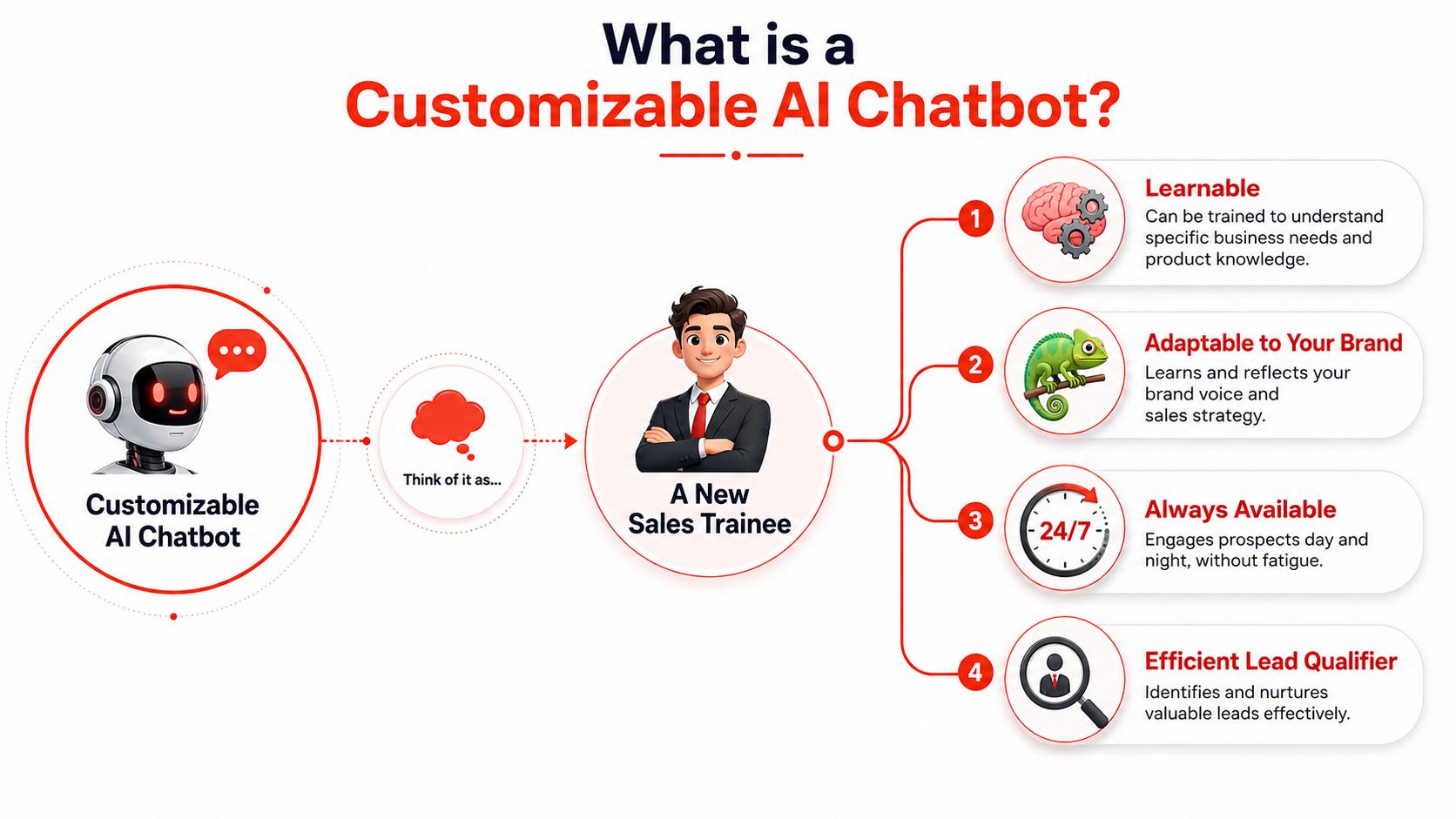
The easiest way to think about a customizable AI chatbot is this: it’s a new sales trainee that never sleeps, but it only performs well if you train it properly.
A weak chatbot is just a script with a chat bubble attached. It asks the same canned questions, misses obvious intent, and gets confused the moment a visitor writes like a normal person. A strong one behaves more like a trained rep. It can interpret what the person means, remember what was already said, and answer based on your business information instead of generic internet patterns.
The three parts that matter
A modern customizable AI chatbot is strongest when it combines NLU, context retention, and RAG, as described in Chatty’s guide to chatbot requirements.
Here’s what that means in plain language:
- Natural Language Understanding: The bot can interpret what a visitor is asking, even if they use slang, typos, or incomplete phrases.
- Context retention: It remembers prior messages, so the visitor doesn’t have to repeat details every turn.
- Retrieval-Augmented Generation: It answers from your actual business content, such as service pages, FAQs, policy documents, or internal knowledge, instead of relying only on model memory.
That combination is what separates “chat that sounds smart” from “chat that is useful.”
Why customization is the real product
The word “customizable” matters more than “AI.”
If you run a home service company, a dental practice, a law office, or a marketing agency, your chatbot shouldn’t sound like a generic software demo. It should reflect how your team talks, what you sell, and what you need to collect before a handoff.
That includes things like:
- Brand voice: formal, friendly, concise, consultative
- Qualification logic: project type, urgency, location, company size, budget fit
- Allowed claims: what the bot can say with confidence
- Escalation triggers: when it should stop guessing and route to a human
For niche use cases, seeing how others approach industry-specific setups can help. Teams working on field service and trades often start by reviewing examples of chatbots for contractors because those deployments depend heavily on qualification, area coverage, and booking intent.
A customizable chatbot isn’t “smart” because it talks a lot. It’s smart when it knows your boundaries and uses your information.
The Business Case for 24/7 Automated Engagement
A chatbot on a business website should justify itself with pipeline value. If it doesn’t help capture, sort, or move leads forward, it’s decoration.
The business case is strong because companies are not treating this category like a short-term experiment. The global AI chatbot market is projected to grow from $15.6 billion in 2024 to $46.6 billion by 2029, a nearly 3x increase in five years, according to Rev’s chatbot market summary. That projection reflects sustained investment in chat as a customer-facing system for sales and engagement.
Capture more of the demand you already paid for
Most SMBs don’t need more theory about lead generation. They need to stop wasting the attention they already bought or earned.
When someone lands on your website, they usually fall into one of three buckets:
| Visitor type | What they need | What a good chatbot does |
|---|---|---|
| Early researcher | Quick orientation | Points them to the right service and answers simple questions |
| Mid-funnel evaluator | Fit confirmation | Explains process, handles objections, and asks qualifying questions |
| High-intent buyer | Fast next step | Captures details and routes to booking or human follow-up |
Without chat, all three groups get the same treatment. “Fill out the form.” That's lazy funnel design.
A better approach is to let the site respond in real time, then route people based on intent. If you want to compare that model against a standard chat widget setup, this guide to a chatbot for website lead capture is a useful reference point.
Qualification saves your team from bad follow-up
A lot of teams say they want more leads, but they want better leads.
That's where a customizable AI chatbot earns its keep. It can ask questions that your sales team already asks manually. Not in a robotic interrogation, but inside a normal conversation. That might include service category, timeline, problem type, business size, or whether the visitor wants a quote, consultation, or support.
The payoff isn't just convenience. It changes who gets attention first.
- Urgent buyers can move faster.
- Poor-fit inquiries can be filtered without burning rep time.
- Incomplete requests can be clarified before they hit the inbox.
Fast response improves first impressions
Visitors judge responsiveness before they ever speak to your team. If the first interaction feels slow, vague, or dead-ended, the brand feels slow too.
A chatbot can't replace a strong closer. It can handle the messy middle between anonymous visitor and qualified conversation. That middle is where many websites fail.
Businesses don't lose leads only because they lack traffic. They lose leads because they make motivated visitors wait.
How to Make an AI Chatbot Truly Yours
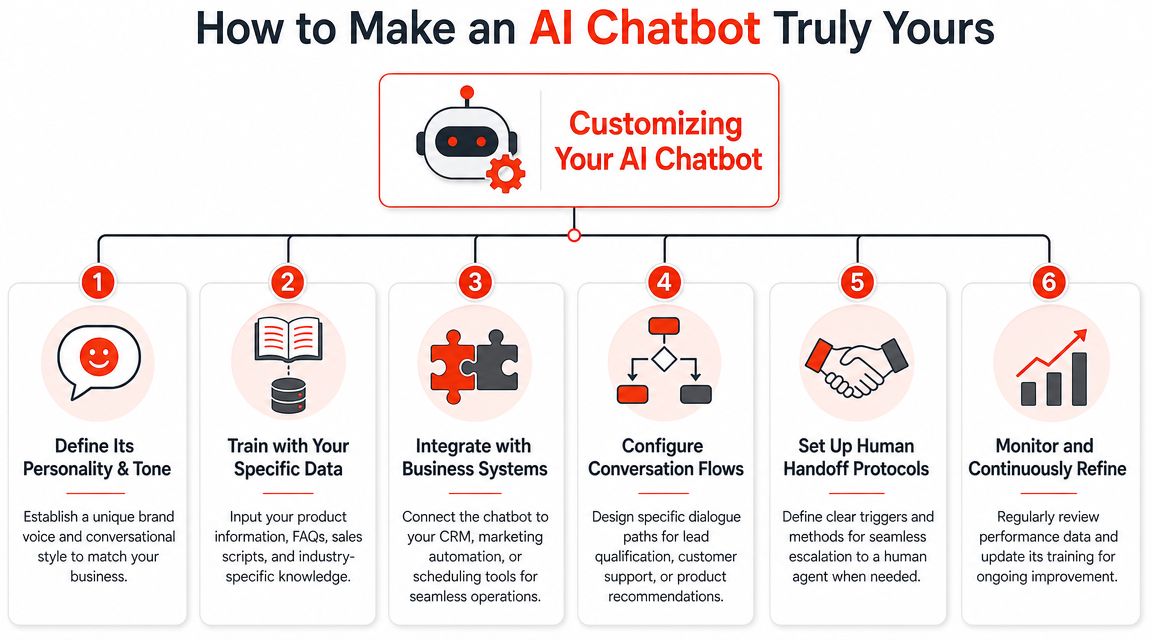
Most chatbot setups fail because the owner stops at installation. They add the widget, test two questions, and assume the bot is ready. That's not customization. That's deployment.
The difference between a generic assistant and a useful one comes from a handful of decisions you control.
Start with qualification rules
If your team follows up on every inquiry the same way, the chatbot won't offer much advantage.
Set the bot up to collect the details that determine lead quality in your business. For an agency, that may be service interest, timeline, and current marketing stack. For a local service company, it may be location, job type, and urgency. For a clinic, it may be treatment interest and whether the visitor is a new or returning patient.
Not every conversation needs the same depth. Keep it adaptive.
- High-intent visitors: Ask for the few details your team needs to take action.
- Low-intent visitors: Answer questions and offer a lighter next step.
- Unclear visitors: Let the bot clarify before asking for contact data.
Define voice before you write prompts
Brand tone is usually treated like a cosmetic choice. It isn't. Tone determines whether the bot feels trustworthy or canned.
A family dental practice shouldn't sound like an enterprise SaaS rep. A law firm shouldn't sound like a playful ecommerce brand. Write a short voice guide first. Include how formal the bot should be, how short its answers should stay, what words it should avoid, and how it should handle uncertainty.
This also matters if your chatbot is part of a wider operational stack. Teams thinking beyond chat alone often pair qualification with AI workflow automation so the handoff, tagging, and follow-up logic stay consistent after the conversation ends.
Choose the right data to capture
Name, email, and phone number are a weak default. They often tell you almost nothing about whether the lead is worth immediate follow-up.
Collect what helps your team act. Useful fields vary by business, but common examples include:
- Problem statement: what the visitor needs help with
- Timeline: immediate, this month, researching
- Service fit: which offer they're asking about
- Location or region: especially for service-area businesses
- Preferred next step: call, quote, booking, email follow-up
If you're evaluating setup approaches, this walkthrough on how to make a chatbot is helpful because it connects configuration choices to lead quality instead of treating customization like a design exercise.
Field note: The best qualification question is one your sales team already uses to decide who gets called first.
Connect the bot to real workflows
A chatbot becomes operationally useful when the conversation goes somewhere.
That can mean sending leads into a CRM, notifying a rep, triggering an email sequence, logging intent categories, or pushing a booking-ready inquiry straight to the calendar flow. Without those connections, the bot may collect data but still leave your team doing manual triage in a shared inbox.
Customization isn't one setting. It's the sum of these business rules.
Your Implementation Plan for a Smarter Chatbot
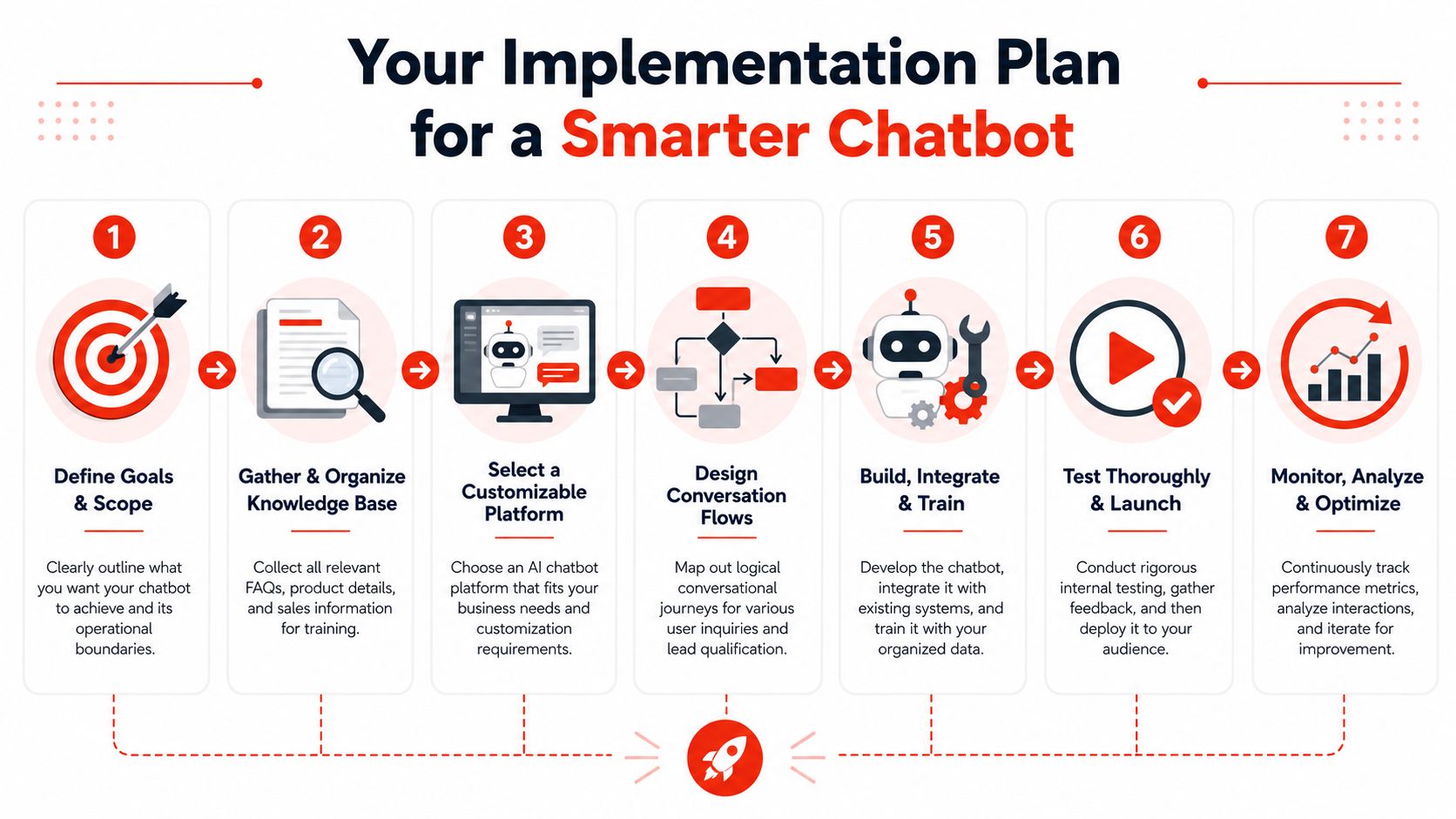
The hard part of launching a chatbot usually isn't code. It's getting the information, instructions, and internal process into shape before the first live conversation.
That's good news for SMBs and agencies because it means success depends more on operational clarity than on engineering depth.
Step one is cleaning your source material
A major challenge in deployment is data preparation. Technical guidance summarized by Focused.io's chatbot architecture article makes the point directly: the bot can't ingest a messy website directly and work well immediately.
That shows up in predictable ways. Old pricing pages confuse answers. Duplicate service pages create inconsistent responses. Thin FAQ content leaves the bot with gaps. Vague copy gives it nothing concrete to retrieve from.
Start with a simple audit:
- Remove outdated pages: archive or rewrite content you wouldn't want a rep quoting.
- Build a usable FAQ set: focus on key objections and repetitive questions.
- Standardize service descriptions: use clear language for offers, process, and next steps.
- Write prompt guidance: tell the bot how to answer, what to avoid, and when to escalate.
Give retrieval something useful to work with
For higher-accuracy custom bots, a common implementation pattern is to break source documents into 200 to 500 token chunks, convert them to embeddings, and store them in a vector database such as Pinecone, Weaviate, ChromaDB, or Qdrant, as described in FwdSlash's guide to custom knowledge base chatbots. Even if you never touch that stack directly, the practical takeaway is simple: the bot works better when your content is organized into clean, answerable units.
If your use case is complex enough to need custom integrations, action logic, or deeper retrieval setup, it helps to review what teams mean by custom AI agent development before you choose between a no-code tool and a custom build.
Align the humans before launch
The handoff process matters as much as the bot itself.
Make sure the team knows:
- Which leads require immediate response
- Where lead summaries arrive
- Who owns after-hours follow-up
- How to correct bad answers and update source content
A chatbot that captures good information still underperforms if nobody acts on it quickly or consistently.
Clean content, clear instructions, and a defined handoff beat a flashy demo every time.
Common Pitfalls That Weaken Chatbot Performance
The most common chatbot mistake is assuming more autonomy equals better performance. In practice, the opposite is often true.
Guidance on trust and governance emphasizes that effective chatbots work best with intentional limits and a clear route to a human when needed, as discussed in this review on chatbot design and real-world constraints. A bot that tries to answer everything can become the least trustworthy part of your funnel.
The dead-end handoff problem
A high-intent visitor should never feel trapped in a loop.
If someone is clearly ready to book, request a quote, or speak with sales, the chatbot should shorten the path, not extend it. Too many setups keep asking questions because the workflow designer wanted more data. That creates friction at the wrong moment.
Use a simple principle: once intent is clear, optimize for speed.
Off-brand tone is expensive
A robotic tone doesn't just sound awkward. It weakens trust.
This usually comes from over-scripted prompts, stiff welcome messages, or replies that are too long and too polished to feel human. Visitors don't need the chatbot to sound clever. They need it to sound helpful and consistent with the business they're considering.
Uncertainty needs a rule
Every chatbot needs a fallback policy. Not a generic “I'm sorry, I didn't understand,” but a real rule for uncertainty.
For example:
- If the answer isn't in the approved knowledge base, say so
- If the question involves pricing exceptions, legal claims, or edge cases, escalate
- If the visitor asks something outside scope, redirect clearly
A chatbot earns trust when it knows when to stop talking.
Neglecting updates breaks accuracy
Websites change. Service offerings shift. Policies get revised. Promotions expire.
If nobody owns chatbot maintenance, the bot slowly drifts away from reality. Then the team starts distrusting the leads it sends, which defeats the whole point of using it.
Your Next Step to Automated Lead Qualification
The practical path is straightforward. Use chat to meet visitors immediately, train it on the information your team trusts, shape it around your qualification process, and make sure human follow-up is fast when intent is strong.
That's the difference between a chatbot that entertains and one that supports revenue.

For SMBs and agencies, the useful version of this doesn't need to become a giant AI project. It needs to be easy to launch, easy to tune, and structured around actual lead handling. That means controlling qualification rules, shaping tone, deciding what data to capture, and giving the team a clean summary instead of a messy transcript.
One option in that category is LeadBlaze. Based on the product details provided by the publisher, it can be added through a WordPress plugin or code snippet, learns from site content, supports custom qualification rules and brand tone, and presents AI-generated lead summaries in a centralized dashboard. If you want more context on setup thinking before choosing a tool, this guide on how to create a bot is a practical starting point.
What a first rollout should look like
Don't launch with every page, every scenario, and every possible workflow. Start narrower.
A smart first deployment usually includes:
- Your core service pages
- A short, high-quality FAQ
- A clear welcome message
- Three to five qualification prompts
- A defined handoff path for strong intent
That gives you enough structure to learn from real conversations without overcomplicating the setup.
Video walkthroughs can also help teams visualize what a deployed website assistant looks like in practice:
The main takeaway is simple. A customizable AI chatbot works when it reflects your sales process, not when it tries to imitate a general-purpose assistant. Focus on response speed, qualification quality, clean source data, and deliberate limits. That's what turns website traffic into conversations your team can close.
LeadBlaze gives SMBs and agencies a practical way to put these ideas into action. You can add it to your site quickly, train it on your content, control how it qualifies leads, and review concise AI-generated summaries in one place. If you want to test a 24/7 website sales assistant without a long implementation cycle, start a free trial of LeadBlaze.