You’re probably in one of two situations right now.
Either your website gets decent traffic but too few leads, or your clients keep asking why their expensive website still acts like a brochure after 5 PM. A prospect lands on your site at night, has one question, can’t get an answer fast enough, and leaves. You didn’t lose that lead because your offer was weak. You lost it because nobody engaged them.
That’s why chatbot development services matter. Not as a novelty. Not as a “we should try AI” project. As a practical way to turn existing traffic into more qualified conversations.
Stop Losing Leads After Business Hours
Most SMBs don’t have a traffic problem. They have a response problem.
A visitor arrives with buying intent. They want to know if you serve their area, whether you accept their insurance, how quickly you can start, or what your pricing process looks like. If your only option is a contact form, you’re forcing a warm prospect into a cold experience.
That’s where a chatbot development service earns its keep. It gives your website a front-line sales assistant that works around the clock, answers common questions, and collects lead details while the visitor is still paying attention.
What actually changes
A good chatbot doesn’t just say hello. It does three jobs at once:
- Engages fast: It starts the conversation before the visitor bounces.
- Qualifies leads: It asks the questions your sales team would ask anyway.
- Routes correctly: It sends serious opportunities to the right person with context attached.
That shift matters more than another SEO tweak or another ad campaign if your site already gets visitors.
Stop treating your website like a digital flyer. If people are landing there with intent, your site should respond like a salesperson.
If you’re still comparing forms, live chat, and AI options, this guide on how to create a bot is a useful place to clarify what kind of experience you want on the site.
The real business issue
Owners often ask, “Do I need more traffic?” Sometimes yes. But often the cheaper win is converting the traffic you already paid for.
If you run a clinic, law firm, home service business, agency, or local multi-location company, after-hours visitors are not casual browsers by default. Many are ready to take the next step. A chatbot development service gives them a way to do that immediately instead of making them wait until morning and reconsider.
What Is a Chatbot Development Service Anyway
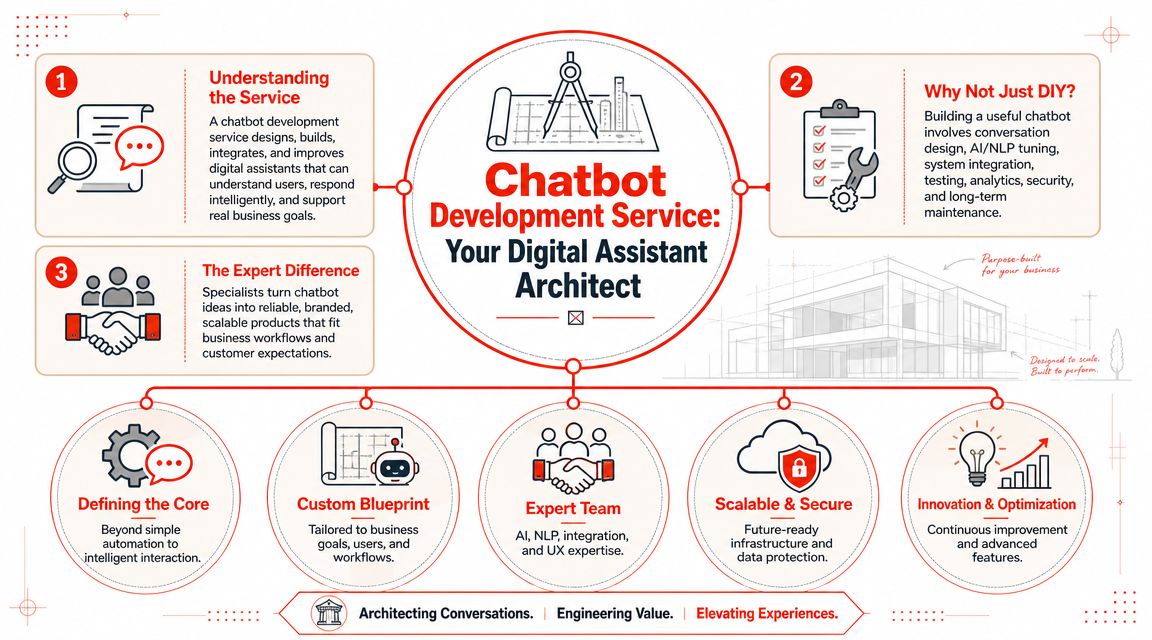
A chatbot development service is not just a chat box. It’s the work behind the chat box that makes it useful.
It’s like this: You can build a custom house from the ground up, or you can move into a furnished place that’s ready now. Both solve the housing problem. One gives you full control and a bigger bill. The other gives you speed and fewer moving parts.
What you’re really buying
When you hire a chatbot provider, you’re usually paying for a bundle of work:
- Conversation design: What the bot says, what it asks, and when it hands off.
- Knowledge setup: The content it uses to answer questions.
- Integration work: Connections to your CRM, calendar, forms, inbox, or help desk.
- Rules and routing: Logic for lead qualification, escalation, and follow-up.
- Testing and maintenance: Ongoing cleanup so the bot doesn’t drift into bad answers.
- Reporting: Visibility into what visitors ask and which conversations produce leads.
That’s why “just use ChatGPT on the site” is weak advice. A raw model isn’t a lead system. It’s a language engine. You still need the business logic wrapped around it.
Why the category matters now
This is no longer a fringe software niche. Grand View Research’s chatbot market analysis estimated the market at USD 9,560.7 million in 2025 and projected USD 41,244.2 million by 2033, with a 19.6% CAGR from 2026 to 2033. That tells you something important. Businesses aren’t experimenting casually. They’re standardizing this as a software category.
If you want broader context on where chatbots fit alongside other operational software, Northpoint Web’s overview of AI tools for businesses is a solid companion read.
The two service models
Here’s the simple version:
| Service model | What it means | Best fit |
|---|---|---|
| Custom development | An agency or dev team builds around your exact workflows | Companies with unusual systems or strict requirements |
| Packaged platform | You use a ready-made product with setup, training, and support | Most SMBs focused on leads, support, and speed |
For most SMBs, the mistake is overbuying. They ask for a custom bot when what they need is a fast, reliable lead qualification assistant.
Custom Build vs Packaged Service Which Is Right for You
Most owners should not start with a custom chatbot build.
That's the blunt answer. Custom is attractive because it sounds specific and strategic. In practice, it often means longer timelines, more meetings, more revisions, and more money tied up before the bot produces a single lead.
The core trade-off
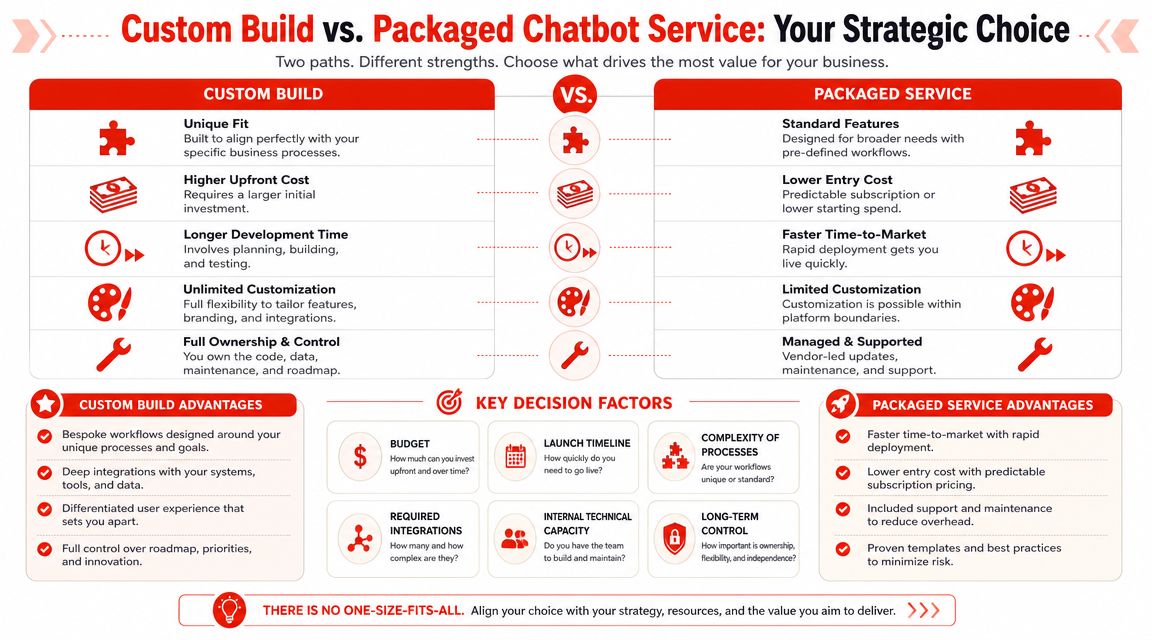
A custom build gives you maximum flexibility. If you need deep CRM logic, proprietary workflows, unusual compliance controls, or multiple internal system integrations, custom may be justified.
A packaged service gives you speed. It usually comes with prebuilt chat behavior, standard integrations, easier setup, and a simpler monthly cost structure. If your goal is more qualified website leads, this path wins for most SMBs.
Here's the clean comparison.
| Factor | Custom Development | SaaS/Managed Service (e.g., LeadBlaze) |
|---|---|---|
| Initial cost | Higher upfront spend | Lower entry cost |
| Launch speed | Slower because everything is configured or built from scratch | Faster because core workflows already exist |
| Customization | Broad flexibility | Usually enough for common sales and support use cases |
| Internal effort | More owner and team involvement | Less day-to-day coordination |
| Maintenance | Your vendor or team keeps tuning and fixing it | Vendor handles most upkeep |
| Risk | More project risk if scope keeps growing | Lower implementation risk for standard use cases |
| Best use case | Complex operations with unique requirements | SMB lead capture, FAQ handling, and qualification |
If you want a practical breakdown of what goes into setup, building an AI chatbot is worth reviewing before you talk to vendors.
Use this rule before you spend
Choose custom only if at least one of these is true:
- Your workflow is unusual: Standard lead forms and CRM handoffs won't cut it.
- Your systems are messy: You need the bot to coordinate across multiple internal tools with custom logic.
- Your legal or security constraints are strict: Off-the-shelf tools can't satisfy them.
- Your team can manage a project: Someone on your side can own vendor coordination and approvals.
If none of that applies, a packaged service is the sensible move.
Practical rule: Buy software for common problems. Buy custom development only for uncommon ones.
Here's a short explainer if you want a visual walkthrough before deciding:
Where owners go wrong
The most common mistake is buying based on features instead of business outcome.
You do not need the most advanced AI stack if your actual need is this: greet visitors, answer basic questions, ask qualifying questions, and push hot leads into email, CRM, or calendar workflows. You need reliability, clarity, and fast deployment.
A custom bot can absolutely do more. It can also delay results while your team debates wording, edge cases, and integration details. For a local service business or agency, speed often beats theoretical flexibility.
Key Benefits and Real-World Use Cases
The point of a chatbot development service is not efficiency for its own sake. The point is revenue from conversations that would otherwise disappear.
That's why I care less about “AI features” and more about what happens when a buyer lands on the site with a question.
What the numbers actually say
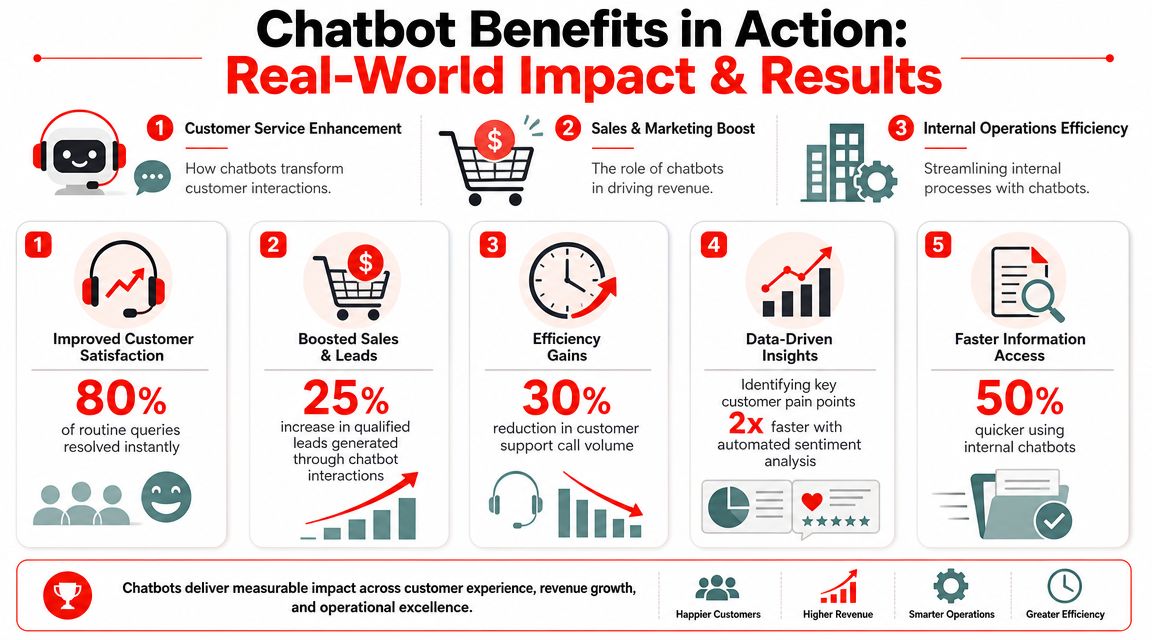
Salesforce noted that service teams commonly use bots for greeting customers, gathering initial information before handoff, and guiding agents. For SMB owners, Salesforce's chatbot statistics roundup also cites a 2026 analysis reporting that chatbot-powered funnels convert 2.4 times more customers than static forms, and businesses using chatbots report 148% to 200% ROI within 12 months, with about $8 returned for every $1 invested.
That doesn't mean every chatbot will perform that way. It does mean static forms are weak competition.
SMB examples that make sense
A local clinic can use a chatbot to answer common appointment questions, collect the patient's preferred location, and flag whether the person wants a new patient visit or urgent follow-up.
A contractor can use one to ask for zip code, project type, timeline, and budget range before the office opens. By morning, the team doesn't just have “someone filled out the form.” They have context.
For agencies, the value multiplies. One chatbot framework can help pre-qualify leads across several client sites, using client-specific questions but the same operating model. That's cleaner than asking every visitor to “book a call” with no filtering.
Why this beats a contact form
A contact form asks visitors to do your work for you. A chatbot guides the exchange.
- It reduces hesitation: Visitors can ask first, commit second.
- It improves handoff quality: Your team gets a summary, not a mystery lead.
- It captures intent in real time: The prospect is still engaged when the system responds.
If your site only offers a form, you're betting that the visitor will do all the work while you do none.
The actual use case isn't “replace humans.” It's “let humans spend time on the leads that already fit.”
Understanding Chatbot Development Costs and Timelines
Most pricing conversations around chatbot services are vague on purpose. Vendors like saying “it depends” because it gives them room to sell up.
Here's the practical version. Cost depends on how much custom work sits behind the chat experience. The more your bot needs to integrate, qualify, route, and adapt to your business rules, the more expensive and slower the project gets.
What drives the bill up
These factors usually increase cost and timeline:
- Integration depth: Connecting to your CRM, calendar, inbox, or internal database adds work.
- Conversation complexity: A lead screener is simpler than a support bot that must answer many different questions.
- Approval cycles: Every revision round slows launch.
- Channel scope: Website-only is easier than adding multiple customer touchpoints.
- Ongoing management: Someone has to review unanswered questions, update prompts, and refine lead logic.
What SMBs should expect instead of fantasy quotes
For a non-technical owner, there are really two pricing models to compare.
| Pricing approach | How it usually feels in practice | Main trade-off |
|---|---|---|
| Custom project fee | Bigger upfront payment, more planning, more vendor time | Flexibility, but less predictability |
| Monthly SaaS or managed service | Lower commitment to start, simpler budgeting | You work within a platform's boundaries |
Custom builds often look impressive in a proposal because everything is “specifically designed.” That customization is exactly what makes the timeline slippery. The first version may launch, but change requests keep coming because real visitors ask different questions than the planning document predicted.
A packaged service is less glamorous, but it's usually better for budgeting. You know what you're paying each month, and the vendor has already solved common problems like widget setup, lead capture, and dashboard reporting.
How to think about total cost
Don't compare only sticker price. Compare total cost of ownership.
That includes:
- Your time in meetings and approvals.
- Your team's time updating content.
- Vendor support when the bot fails on edge cases.
- Delays in getting the thing live.
- Lost opportunities while the project drags.
A cheaper custom quote can become more expensive if it burns two months of management attention. A higher monthly subscription can be cheaper if it starts qualifying leads next week.
Cheap software that needs constant babysitting is not cheap.
For SMBs, the right buying question is simple: how fast can this go live, and how little internal effort will it require after launch?
Your Practical Checklist for Hiring a Chatbot Partner
Most owners ask the wrong first question. They ask, “What can your chatbot do?”
Ask this instead: “How will this help my team get more qualified leads without creating another system to manage?”
That one question changes the whole buying process.
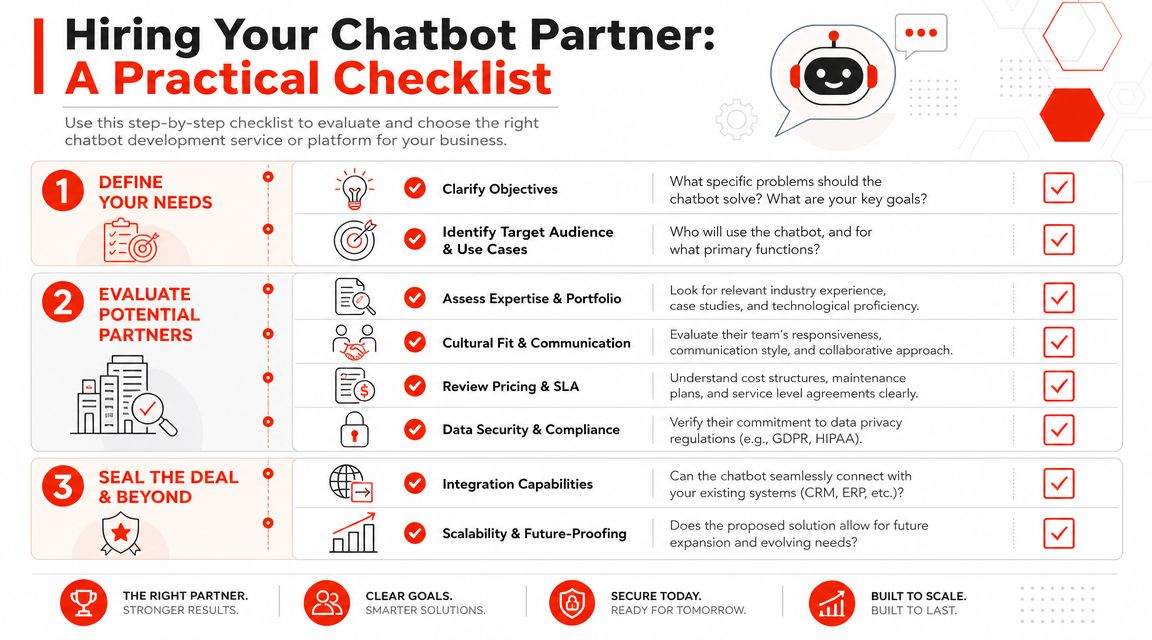
Questions to ask before any demo
Walk into vendor conversations with this list:
- What exact lead qualification questions can we control? You need custom logic, not generic greetings.
- How does the bot handle questions it doesn't know? If the answer is fuzzy, expect bad visitor experiences.
- What happens after a lead is captured? Email, CRM, booking flow, owner alert, or all of the above?
- Show me the reporting dashboard. If you can't see conversation quality, you can't improve it.
- Who updates the knowledge when our business changes? This determines future workload.
- How is handoff handled? Visitors need a graceful route when the bot reaches a limit.
Ask one smart technical question
You don't need to be technical, but you do need one diagnostic question that separates modern providers from clumsy ones:
“Do you use a retrieval-augmented generation approach for changing knowledge, or are we relying on static intent training?”
That matters because AgileEngine's guide to AI chatbot development notes that an effective service should use retrieval-augmented generation (RAG) when answers need to come from a changing knowledge base. It reduces the need to retrain the model for every content update while grounding responses in business data.
If a provider can't explain that plainly, they may not be the right partner.
What a good answer sounds like
A solid vendor should be able to say:
- How updates work: “You change site content or source material, and the bot can use the latest version without a full rebuild.”
- How fallback works: “If confidence drops, the bot escalates or asks a clarifying question.”
- How lead quality is protected: “We set rules for who counts as qualified and capture that data consistently.”
If you want a broader buyer's view before narrowing vendors, this roundup on what is the best chatbot gives useful context on the kinds of SMB tools on the market.
The red flags
Skip vendors who do any of the following:
- They hide behind buzzwords: Lots of AI language, little explanation of workflow.
- They can't show examples of lead routing: That's the business core.
- They make setup sound effortless but training vague: Easy install means nothing if the bot answers poorly.
- They don't discuss fallback behavior: Every bot fails sometimes. Good providers design for that.
A chatbot partner should make your intake process tighter, not more complicated.
Frequently Asked Questions About Chatbot Services
Can a chatbot work with my current website and CRM
Usually yes, but don't assume all vendors support the same setup. Ask what happens after the chat ends. The important part isn't just putting a widget on your site. It's sending lead details to the places your team already uses.
If a provider can't explain the handoff clearly, the integration story is incomplete.
How much of my time will setup take
That depends on the model you choose. A custom project usually takes more owner input because someone has to approve flows, messaging, logic, and integration decisions.
A packaged platform usually asks for core business info, qualification questions, brand tone, and routing preferences. That's far less painful for a small team.
How do I measure ROI
Use operational signals first, then revenue signals.
Start with lead quality, speed to first response, and whether your team is getting better intake details. Then look at downstream outcomes like booked calls, qualified opportunities, and closed deals. If your team says, “These leads are coming in better prepared,” that's already meaningful progress.
Will a chatbot replace my receptionist or sales coordinator
No. It should remove repetitive front-end friction.
A good bot handles first contact, basic questions, and qualification. Your people still handle nuance, objections, and closing. The value is that humans stop wasting time on low-context inquiries.
What if the bot gives a bad answer
That risk is real. That's why fallback design matters.
You want a provider that can explain how the bot responds when it's uncertain, how content gets updated, and how your team can review conversations. A chatbot without a recovery plan becomes a liability.
Should I buy a chatbot before hiring a marketing agency
Not always, but the decision is related. If you're also reviewing outside help for traffic, content, or conversion work, this guide on choosing a marketing agency for growth helps frame the bigger decision around execution and accountability.
What's the smartest move for a typical SMB
Start simple. Focus on lead capture, qualification, and after-hours response. Don't buy a giant automation project when what you need is a better first conversation.
One practical option in this category is LeadBlaze, which adds an AI sales assistant to a website through a WordPress plugin or code snippet, learns from site content, lets teams define qualification rules and brand tone, and gives lead summaries in a dashboard on a simple monthly plan. That kind of setup fits SMBs that want faster deployment without managing a custom build.
If your website already gets visitors, you don't need another passive form. You need a system that engages people while they're still ready to talk. LeadBlaze is built for that. It gives SMBs and agencies a 24/7 AI sales assistant that answers questions, qualifies visitors, and delivers cleaner lead context without a custom development project.