A potential customer lands on your website at 9:40 p.m. They’re ready to ask a real question, not just browse. They want pricing, timing, availability, or whether you handle their specific use case. Instead of getting an answer, they see a contact form and a promise that someone will reply tomorrow.
By morning, that person may have already booked with someone else.
That’s the problem most SMBs are dealing with. Not ticket volume. Not abstract automation strategy. The core problem is that too many websites still act like brochures when they should act like front-line sales and service staff.
Rethinking Your First Impression with AI
Most businesses still think about AI for customer service as a way to deflect repetitive support tickets. That use case is real, but it’s too small. The better question is what happens before a support ticket ever exists.
McKinsey’s view is much more useful for SMBs. It argues that the bigger opportunity is not just reducing routine service work, but reimagining every touchpoint to increase engagement, loyalty, and lifetime value through AI-enabled customer engagement. That changes the buying conversation immediately.
If you run a local service business, agency, clinic, SaaS company, or e-commerce brand, your website gets visitors who are evaluating you in real time. Some are support seekers. Some are sales prospects. Some are current customers trying to decide whether to buy again. Treating all of them like “form submissions” is a conversion leak.
Static forms create friction
A static contact form asks the visitor to do all the work. They have to decide what to write, what details matter, and whether you’ll even respond. An AI assistant changes that first impression from passive to active.
It can:
- Greet the visitor immediately with context-aware questions
- Answer basic buying questions without delay
- Qualify intent before a human steps in
- Collect the right details for sales or support follow-up
If you’re exploring more customized setups than a generic chatbot widget, custom ChatGPT solutions are one practical path for businesses that need tighter control over workflows, brand voice, and data sources.
A lot of companies also underestimate how much the opening message matters. The first line either starts a useful conversation or gets ignored. Good website welcome message examples can make the difference between a bounce and a booked conversation.
Your website’s first job isn’t to look modern. It’s to help the right visitor take the next step without hesitation.
How AI for Customer Service Actually Works
Think of AI for customer service as a digital front-desk employee. Not magic. Not a replacement for your whole team. Just a system that greets people, understands what they need, handles common requests, and routes the tricky ones to the right human.
Here’s a quick visual summary of the business case.
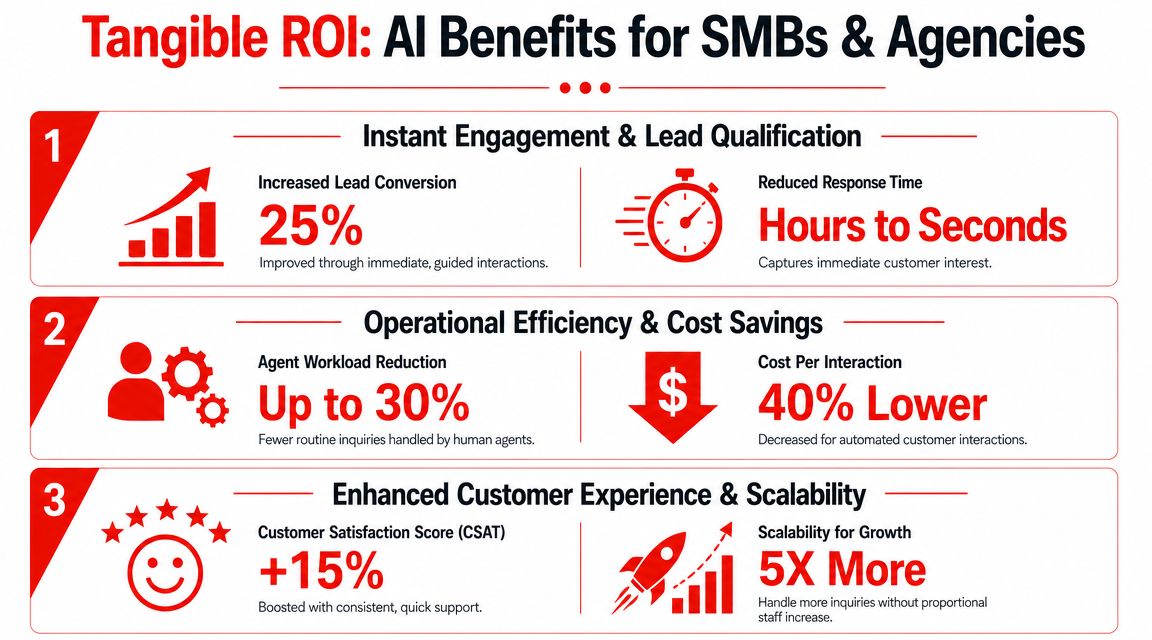
At a practical level, the system listens to what the customer types, identifies intent, pulls an answer from approved information, and decides whether to continue, ask a follow-up question, or escalate. IBM explains that AI assistants use NLP and ML to understand customer intent in real time, and that better intent detection reduces transfers and wait times while interaction data improves future answers through knowledge base enrichment in its overview of AI in customer service.
What the core components actually do
The jargon gets simpler when you map it to business tasks:
- Natural language processing helps the system understand what the visitor means, even if they don’t phrase it perfectly.
- Machine learning helps the system improve from past conversations, especially when you review failures and refine responses.
- Knowledge retrieval pulls from your FAQ, service pages, policies, docs, or CRM-connected context.
- Routing logic decides whether to answer directly, ask another question, or hand the conversation to a person.
This is why narrow implementations usually work better than broad ones. A bot trained to handle your most common pricing, scheduling, qualification, and policy questions will usually outperform a generic “ask me anything” setup.
Where businesses get value first
The fastest wins tend to come from routine, high-volume conversations. That includes things like service area checks, appointment questions, package differences, onboarding basics, return policies, and intake questions.
If your team is buried in the same conversations every day, it helps to study how other companies resolve repetitive support questions with AI before building your own playbook.
For a broader look at tool types and setup patterns, this guide to a customer support chatbot is useful because it shows how these systems move from simple FAQ coverage into lead capture and qualification.
Later in the interaction, video is often the easiest way to see the flow in action.
Practical rule: Start with the questions your team answers every week. Don’t start with your hardest edge cases.
The Real Benefits for Your SMB or Agency
The most useful benefit of AI for customer service isn’t “being available 24/7.” That’s table stakes. The actual value comes from what that availability does to lead flow, qualification quality, and team focus.
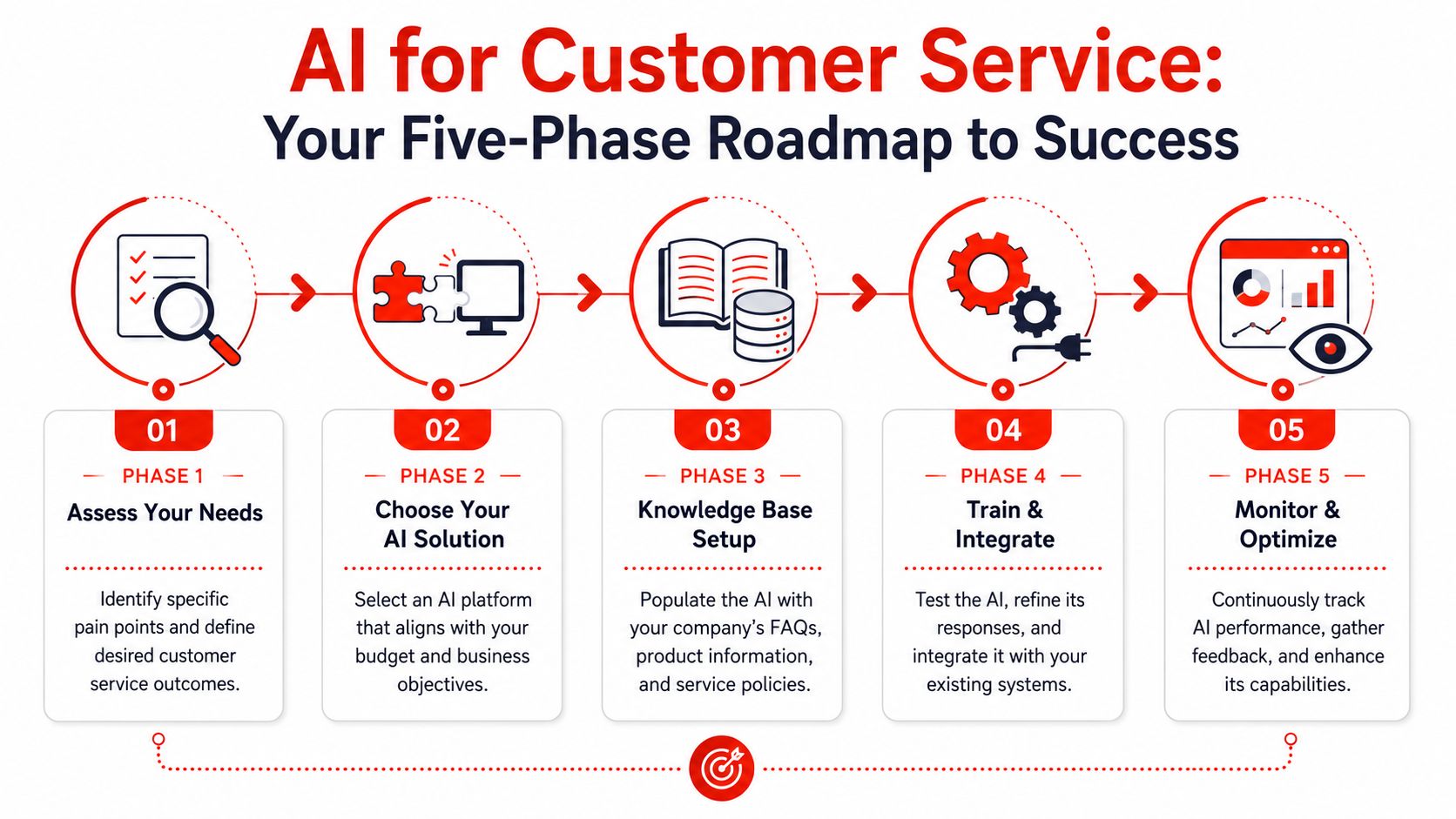
For SMBs, the economics matter. One industry summary cites Gartner benchmarks showing a median cost of $1.84 per self-service contact versus $13.50 for agent-assisted interactions, which is a roughly 7x cost gap. The same summary reports that AI tools can resolve about 65% of tier-1 issues without human intervention in this review of AI customer service statistics.
Better lead handling, not just lower support load
When AI handles initial engagement well, your team doesn’t spend its best hours answering basic questions from low-intent visitors. Instead, sales and service staff step into conversations with context.
That changes three things:
| Business outcome | What AI improves | Why it matters |
|---|---|---|
| Lead response quality | Captures intent, timing, needs, and friction points before handoff | Your team starts with context instead of guessing |
| Pipeline focus | Screens out poor-fit inquiries and routes qualified ones faster | Reps spend more time on viable opportunities |
| Customer experience | Gives consistent answers based on approved information | Fewer misunderstandings at the top of the funnel |
For agencies, this is even more valuable. A website assistant that pre-qualifies leads can serve as a front-line intake layer across multiple client sites without forcing account managers to triage every form submission manually.
The insight layer most teams miss
Conversation volume creates a second advantage. Once you stop treating chats as disposable support interactions, they become a source of market feedback.
Patterns show up quickly:
- Objections people raise before buying
- Confusion about pricing, process, or service scope
- Requests for features, appointment options, or coverage you may not highlight clearly
- Intent signals that show who is ready to buy versus who is still researching
That's why AI belongs inside a broader customer experience digital transformation effort, not as an isolated widget. The conversations can inform sales messaging, landing page copy, FAQ updates, and even service design.
Good AI doesn't just answer questions. It shows you which questions are slowing revenue down.
Your Five-Phase Implementation Roadmap
Most SMBs don't need a massive rollout. They need a disciplined starting point. The businesses that get value quickly usually avoid overbuilding and focus on one customer path first.
Salesforce data, cited by Zuper, shows that 83% of service organizations now use AI in some capacity, up from 56% in 2022. The same source connects adoption to results including 85% faster average response times and a 28% increase in first-call resolution in this summary of AI in customer service statistics. That matters because it shows this isn't a fringe experiment anymore. It's operational infrastructure.
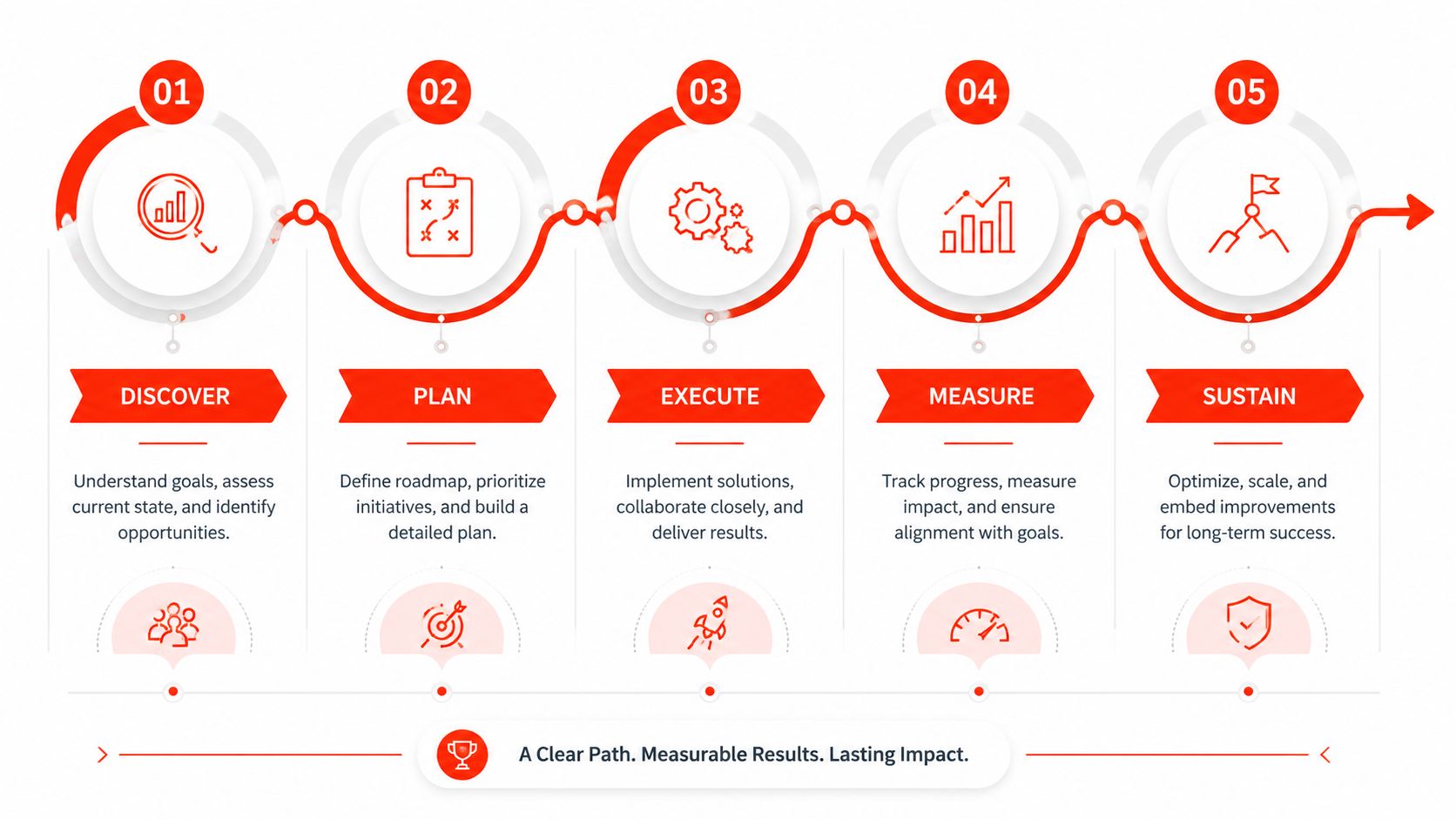
Phase 1 Define one business goal
Pick one outcome. Not five.
Examples include:
- Qualify website visitors before they reach sales
- Answer service questions that block bookings
- Collect intake details before consultations
- Route current customers to the right support path
If you don't define the job, the AI ends up sounding busy without producing value.
Phase 2 Choose one high-impact channel
For most SMBs, the website is the right starting point because that's where anonymous traffic either converts or disappears. This is also why an AI chatbot build guide is more useful than broad thought leadership when you're trying to launch quickly.
Don't start with every channel at once. Website chat, intake, and qualification usually produce the cleanest learning loop.
Phase 3 Load the right knowledge, not all knowledge
A common mistake is dumping every document into the system. That creates messy answers. Start with the sources that directly affect pre-sales and first-line service.
Use:
- Core pages such as pricing, services, features, locations, and policies
- FAQs your staff already answers repeatedly
- Qualification criteria that define a good lead
- Escalation rules for issues the AI shouldn't handle
Phase 4 Configure tone, rules, and handoff
The majority of the quality derives from this. You're not just teaching the system facts. You're defining behavior.
Set:
- Brand voice so the assistant sounds like your business
- Qualification prompts so it collects the details your team needs
- Fallback rules for uncertainty, sensitive cases, or bad-fit leads
- Handoff paths to email, booking, phone, or a human rep
A practical example helps here. Tools such as Intercom, Zendesk, and Drift are often used for service and conversational workflows. For website lead qualification specifically, LeadBlaze is one option that lets teams add an AI assistant through a WordPress plugin or code snippet, train it on site content, define qualification rules, and review summarized conversations in a dashboard.
Phase 5 Launch small and tune aggressively
Your first version won't be perfect. That's normal. What matters is whether you review transcripts, fix weak answers, and tighten routing.
Watch for:
- Repeated unanswered questions
- Confusing prompts
- Low-quality lead captures
- Missed opportunities to escalate sooner
Launching early with narrow scope usually beats waiting for a “complete” setup that never goes live.
Common Pitfalls and How to Avoid Them
Poor AI for customer service usually fails for predictable reasons. The technology isn't the main issue. The operating model is.
One of the biggest problems is the human-computer boundary. AI handles routine queries well, but it often struggles with complex, ambiguous, or emotionally charged situations. The stronger implementations use clear governance, brand-safe guardrails, and defined escalation triggers, as discussed in this analysis of AI versus human agents in customer service.
Pitfall one, no clear escape hatch
A visitor asks a nuanced question. The assistant keeps circling. Frustration climbs because the user can't reach a human or leave context for follow-up.
Fix it by making handoff visible and easy. If the system has low confidence, it should say so plainly and offer a human path. That path might be live chat, a callback request, booking, or an email handoff with the conversation summary attached.
Pitfall two, robotic brand voice
Many teams launch with default prompts and generic wording. The result sounds like outsourced automation, not your company.
A better approach is to write the assistant the same way you'd train a new front-desk hire. Give it examples of how your team greets, clarifies, declines, and redirects. Include phrases you want used and phrases you never want used.
If the assistant sounds off-brand in the first three messages, trust drops fast.
Pitfall three, weak source material
AI can't rescue messy inputs. If your pricing page is vague, your policy page is outdated, and your FAQ contradicts sales language, the assistant will expose those gaps quickly.
Before launch, audit the content behind the system:
- Check accuracy across policies, offerings, pricing references, and service details
- Remove duplicates that say the same thing differently
- Add missing answers for recurring pre-sales objections
- Create approved fallback language for questions the system shouldn't answer directly
Pitfall four, treating it as set-and-forget
The first month tells you more than the setup week. Real visitors phrase things differently than internal teams expect. They ask edge-case questions. They reveal friction you didn't see.
Review conversations regularly and tune the system like you would a sales script or landing page. Good teams keep refining prompts, qualification logic, and handoff rules based on actual conversations.
Your AI Vendor Evaluation Checklist
Vendor demos are easy to overrate. Most look polished. What matters is how the product behaves after launch, when real visitors ask messy questions and your staff has to manage the system without babysitting it.
Use this checklist to separate strong tools from nice-looking software.
AI for Customer Service Vendor Checklist
| Evaluation Criteria | Key Question to Ask | Why It Matters |
|---|---|---|
| Setup speed | Can a non-technical team launch this without a developer? | If implementation is heavy, the project stalls before value shows up. |
| Knowledge control | Can we choose exactly which content and sources the AI uses? | You need answer quality based on approved business information, not guesswork. |
| Qualification logic | Can we define our own lead questions, routing rules, and disqualification criteria? | Generic chat isn't enough if your goal is revenue and not just conversation volume. |
| Brand voice | Can we control tone, wording, and response style? | The assistant becomes part of your first impression. It can't sound generic. |
| Human handoff | How does escalation work when the AI gets stuck or the issue is sensitive? | A bad handoff erases trust and creates more work for staff. |
| Conversation summaries | Do we get concise summaries and key takeaways, or only raw transcripts? | Teams need quick context for follow-up, not another inbox to read. |
| CRM and workflow integration | Does it connect to our forms, booking flow, CRM, or help desk? | The AI should feed the systems your team already uses. |
| Reporting quality | Will we learn what people ask, where they drop off, and which queries need new content? | Good reporting turns conversations into operational insight. |
| Governance controls | Can we set limits on what the AI should not answer or when it must escalate? | Guardrails matter in regulated, high-trust, or high-consideration environments. |
| Onboarding support | Will someone help us configure the first version properly? | Many weak launches come from poor setup, not poor software. |
What strong answers sound like
You're looking for specificity, not slogans. A good vendor should show you exactly how rules are configured, how knowledge is updated, how handoff works, and what your team sees after a conversation ends.
If the demo leans on broad claims but avoids workflow details, that's a warning sign.
What to test before you buy
Run your own scenarios. Don't let the vendor choose all the prompts.
Try:
- A common buyer question from your site
- An ambiguous question with multiple meanings
- A sensitive question that should escalate
- A poor-fit lead inquiry that should be filtered
- A returning customer issue that needs context
The right vendor won't just show that the AI can respond. They'll show that it can respond in a way that fits your business model.
Taking Your First Step Today
AI for customer service has already moved past the stage where SMBs can treat it as an enterprise-only experiment. The more useful shift is seeing it as a growth tool, not just a support shortcut.
If your website still relies on passive forms, delayed replies, and manual follow-up, you're probably losing qualified conversations before your team even sees them. An AI assistant can change that by engaging visitors immediately, answering routine questions, and collecting the details that matter before a human joins.
Start small. That's what works.
A simple first move looks like this:
- List your most common visitor questions from sales calls, support inboxes, and contact forms.
- Choose a tool that's easy to launch and gives you control over tone, knowledge, and qualification logic.
- Put it live on your website and review the conversations from the first week for missed answers, strong leads, and recurring objections.
That's enough to learn whether your site is starting more useful conversations than it did before. In most cases, the answer shows up quickly in lead quality, response speed, and the amount of repetitive triage your team no longer has to do.
If you want a practical way to turn website traffic into qualified conversations, LeadBlaze gives SMBs and agencies a 24/7 AI assistant that can answer questions, qualify leads, and summarize interactions without relying on static contact forms.