Your website may already be doing the hard part. It attracts visitors, gets clicks from search, and earns enough trust for someone to stay on the page. Then the moment that matters arrives. A visitor has a question that doesn’t fit neatly into a contact form, doesn’t want to wait for a callback, and isn’t ready to dig through five service pages.
That lead often disappears.
Most small businesses don’t have a traffic problem as much as a conversion problem. The site works like a brochure when it should work like a front-desk rep, a sales assistant, and a qualification layer all at once. That’s where the conversation around AI agent frameworks gets practical. This isn’t about adding a flashy widget. It’s about deciding whether your website can actively guide visitors toward the next step, or whether it keeps passively hoping they fill out a form.
Why Your Website Needs More Than a Simple Chatbot
A basic chatbot follows a script. It answers common questions, points people to a page, and gets stuck the moment a conversation becomes messy.
That matters because real buyers don’t behave like scripted users. They ask half-formed questions. They mention timelines, budget concerns, service areas, urgency, and edge cases in the same message. If your bot can only match canned intents, it stops being helpful right when buying intent shows up.
What breaks with old chatbot logic
A simple chatbot usually fails in three places:
- Rigid paths: It expects the visitor to ask the “right” question in the “right” order.
- Weak qualification: It can collect a name and email, but it can’t adapt its follow-up questions based on what the person just said.
- Poor handoff timing: It doesn’t know when to escalate to a human because it isn’t tracking conversation state in a meaningful way.
That’s the difference highlighted in Cyndra’s guide to AI agents. The useful distinction for business owners isn’t academic. A chatbot answers. An agent can pursue a goal.
If you run a local service company, that goal may be simple and valuable: find out whether the visitor is in your service area, what job they need done, how urgent it is, and whether they should book now or wait for a human follow-up. A niche example is how companies think about an AI chatbot for HVAC companies, where a useful conversation has to do more than greet visitors. It has to sort emergency jobs from routine quotes and gather details without creating friction.
Practical rule: If your website assistant can’t ask better follow-up questions after each answer, it isn’t helping sales much.
What a website agent changes
A stronger website agent doesn’t just sit there waiting. It engages, clarifies, qualifies, and routes.
That changes the economics of your site. Instead of treating every visitor the same, the assistant can treat a price shopper differently from someone with an urgent need. It can answer factual questions, gather context, and move the conversation toward a defined business outcome.
For many SMBs, that’s the opportunity. Not “AI for AI’s sake.” Better conversations with people who are already on your website.
Understanding What AI Agent Frameworks Really Are
An AI agent framework is the part that turns a language model into a working system. It handles memory, tool use, decision flow, guardrails, and the logic for what should happen next.
For a business owner, that distinction matters because “AI agent” and “AI agent framework” are not the same purchase. The agent is the assistant your customer interacts with. The framework is the underlying toolkit used to build and run it.
That is why feature lists can be misleading. A framework may look powerful on paper and still be the wrong choice for a small business that just wants a website agent answering questions, qualifying leads, and handing off cleanly to a human.
A useful overview for non-technical readers is Flaex.ai’s explainer on AI agents, especially if you’re trying to separate real capabilities from vendor language.
What frameworks actually do
In practice, frameworks solve a coordination problem.
A model can generate text. A framework decides what context the model sees, what business rules it must follow, which tools it can call, what information it should remember, and how it should recover when a conversation goes off track. Without that layer, results are inconsistent. With it, you can build something that behaves more predictably across hundreds of customer conversations.
That is also why developers talk about frameworks in categories. The labels vary, but the practical split is usually close to this:
| Framework type | Best fit | Common trade-off |
|---|---|---|
| LLM-centric | Fast experiments, prompt-driven assistants | Quick to start, easier to outgrow |
| Multi-agent systems | Complex tasks split across specialist roles | Harder to test, debug, and control |
| Workflow-oriented | Structured automations with defined paths | Less flexible in messy conversations |
| Enterprise platforms | Teams that need governance, permissions, and auditability | More setup and more process |
Popular names come up often for a reason. LangChain is widely used for chaining prompts, tools, and logic. AutoGen is known for multi-agent orchestration. CrewAI is often used for role-based task flows. LlamaIndex is commonly chosen when the job depends heavily on retrieving information from documents and knowledge sources.
For SMBs, the category matters less than the operating model behind it. A raw framework gives flexibility, but it also gives you ownership of setup, testing, prompt control, edge cases, logging, and ongoing maintenance.
The real business decision is rarely "Which framework is best?" It is "Do we want to build and manage this system ourselves?"
Why this matters for Build vs. Buy
If your goal is a website AI agent for lead capture, the framework is not the outcome. Leads are the outcome.
That sounds obvious, but it is where many SMB projects go sideways. Teams start comparing framework architectures before they have defined what the agent should accomplish. For example: greet visitors, answer service questions, qualify fit, collect contact details, and route high-intent leads to booking or follow-up.
In consulting work, this is the break point I watch for. If the business needs a custom process, unusual integrations, or tight control over conversation logic, building on a framework can make sense. If the business mainly wants a reliable website agent live this quarter, a managed solution is often the better call.
Frameworks are powerful. They also come with real overhead. Business owners should evaluate them as building materials, not as the finished product.
The Core Components of a Modern AI Agent
A website visitor asks a simple question, “Do you serve my area?” A basic chatbot returns a canned paragraph. A real agent checks location rules, pulls the right service info, asks one follow-up question, and if the lead looks qualified, sends the conversation into your CRM or booking flow.
That difference comes from system design, not just model quality.
Reasoning, memory, and planning
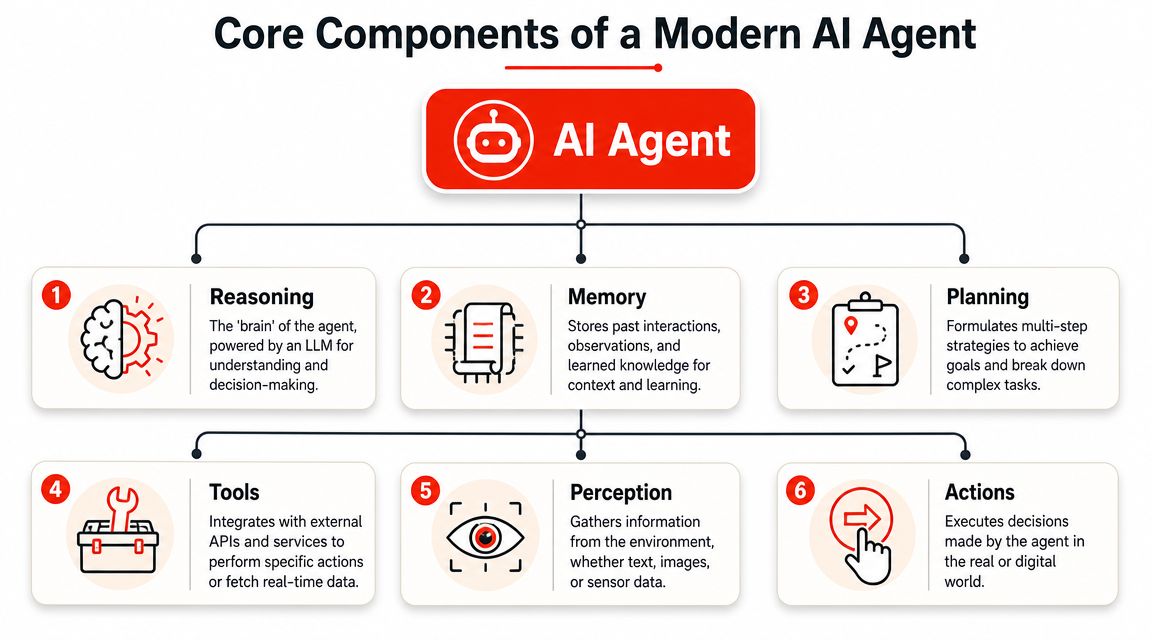
Three components usually determine whether an agent feels helpful or sloppy: reasoning, memory, and planning.
Reasoning is the judgment layer. It interprets what the visitor means, weighs the options, and chooses the next step. If someone says, “I need help fast and I'm not sure which service fits,” reasoning helps the agent decide whether to explain, qualify, or route.
Memory keeps the interaction coherent. That includes the current conversation, business facts, and information gathered a few turns earlier. Without memory, the agent asks the same question twice or forgets the lead already shared their timeline.
Planning gives the conversation shape. For a lead capture flow, that often means:
- identify the visitor's goal
- ask the next best qualifying question
- answer the concern using business-specific information
- collect contact details at the right moment
- trigger the right handoff
Businesses feel the difference quickly. An agent with no plan sounds clever for two messages, then starts wandering. An agent with a clear plan can guide someone from first question to booked call.
Tools, perception, and actions
The second half of the system is what turns a smart responder into a working business asset.
- Perception: the inputs the agent can read, such as chat messages, page context, prior session behavior, documents, CRM records, and API responses
- Tools: the systems it can use, such as your scheduler, CRM, knowledge base, quoting tool, or ticketing platform
- Actions: the tasks it can complete, such as logging a lead, sending an email alert, assigning a rep, or handing the chat to a person
Build vs. buy considerations become practical for SMBs. On paper, these components sound straightforward. In practice, each one adds setup work, testing, permissions, failure handling, and maintenance. A framework gives you control over how those parts connect. A managed product reduces that burden, but you give up some flexibility.
That trade-off is usually the key decision.
A practical marketing example is the broader logic behind implementing AI marketing frameworks. The business return improves when the agent is tied to real workflows instead of left as a standalone chat feature.
The closed loop is what makes it useful
Domo's guide to AI agent frameworks describes agents as closed-loop systems. They take in information, evaluate what to do, act, and then use the result to inform the next step, as summarized in Domo's guide to AI agent frameworks.
For a business owner, that means the agent does more than answer one message well. It can work through a task. It can notice whether the visitor is still confused, whether required details are missing, or whether the right outcome is booking, follow-up, or escalation.
An AI agent starts producing business value when it can use your context and complete a workflow, not just generate fluent text.
Why RAG matters to a business owner
Retrieval-augmented generation, or RAG, is one of the parts that matters most in a website agent. It lets the system answer from your actual business information, such as service pages, policies, pricing notes, FAQs, and internal documents.
Without RAG, the model fills gaps with general knowledge. That can sound polished while still being wrong for your business.
With RAG, the answer is more likely to reflect your service area, your process, your offer, and your rules for qualification. For lead capture, that matters because accuracy affects conversion. If the agent gives vague answers or misses a key policy, good prospects drop off.
This is also where many SMB builds get harder than expected. The framework can provide the wiring, but someone still has to structure the data, clean the content, test retrieval quality, and monitor answers over time. That is why some businesses should build, and others should buy. The right choice depends less on how impressive the framework looks and more on whether your team can operate all six components reliably after launch.
How to Evaluate AI Solutions for Your Business Needs
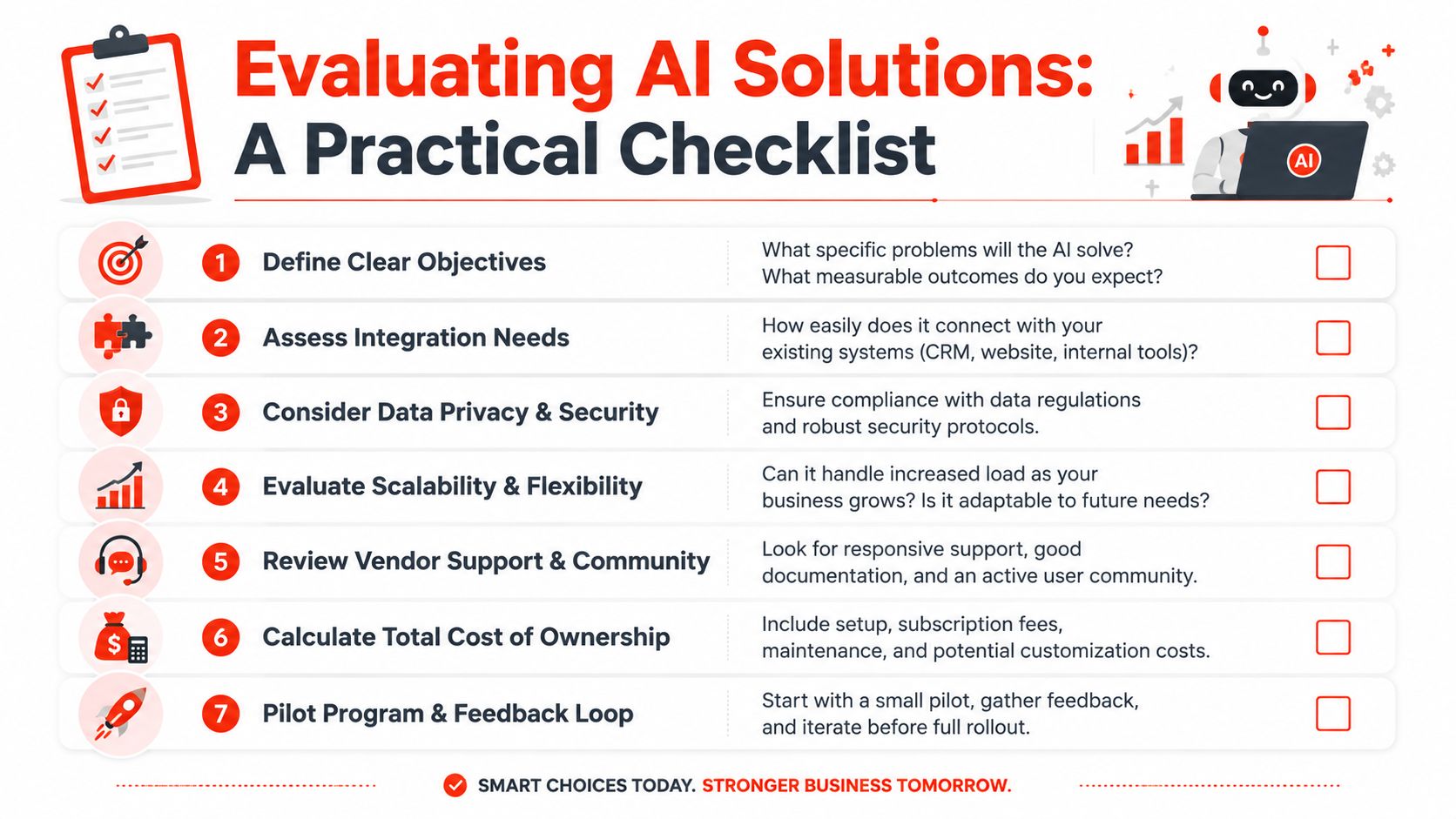
Most buyers compare AI solutions the wrong way. They compare feature lists before they compare operating reality.
That leads to bad decisions. A framework can look impressive in a demo and still be a poor fit for a small business that needs leads this quarter, not a custom software project that stretches on for months.
Start with business constraints, not product demos
Before looking at LangGraph, CrewAI, AutoGen, or any managed tool, answer these questions:
- What outcome matters most: More qualified leads, fewer missed inquiries, faster handoff, or lower admin work?
- How much engineering support do you have: A technical founder is one thing. An actual team that can maintain integrations is another.
- How fast do you need value: This month, this quarter, or as an internal R&D effort?
- How much operational risk can you absorb: If the agent misroutes people or gives weak answers, who catches that and fixes it?
Monday.com's industry guide makes a point that many feature roundups skip. The hidden decision isn't just which framework looks best. It's whether the team has the engineering capacity to run orchestration, integrations, persistence, monitoring, and maintenance over time. The practical SMB question is often not “Which framework?” but “Should we use a framework at all, or use a no-code or low-code approach?” as described in Monday.com's framework comparison.
A simple decision matrix for SMBs
Use this as a gut-check.
| If this sounds like you | Better path |
|---|---|
| You need a working website agent quickly | Managed platform or embedded solution |
| You have unusual workflows and internal technical talent | Custom build with a framework |
| You want full control over tool logic and orchestration | Framework-based build |
| You mainly want better lead capture and qualification | Buy before you build |
| You don't want to own hosting, monitoring, and upkeep | Managed platform |
Buying rule of thumb: If the business problem is common and the implementation burden is high, buying usually wins.
The costs people miss
Open-source can be the right choice. It can also become a quiet drain.
The “free” part usually covers access to the framework code. It doesn't cover the work required to make it dependable in production. Someone still has to connect systems, manage prompts, tune retrieval, test conversations, monitor failures, update components, and keep the whole thing aligned with the business.
Here are the costs that are easy to underestimate:
- Developer time: Building is one project. maintaining is the primary commitment.
- Tooling sprawl: You may need separate systems for analytics, observability, logging, or review workflows.
- Integration work: CRM, calendar, forms, docs, and website behavior often need custom handling.
- Prompt and data maintenance: The agent won't stay accurate if your business changes and the inputs don't.
What works in the field
For SMBs, a few patterns tend to work better than others.
A narrow first use case works. Lead qualification is better than trying to automate every customer interaction at once.
A visible handoff path works. If the agent can't confidently handle a situation, it should know how to route the conversation.
A pilot mindset works. Start on a subset of pages, services, or traffic sources. Listen to transcripts. Tighten questions. Improve escalation rules.
What doesn't work is chasing maximum sophistication before you've proven that visitors even want to talk to the assistant. Start with the sales bottleneck, not the technology stack.
AI Agents in Action for Website Lead Capture
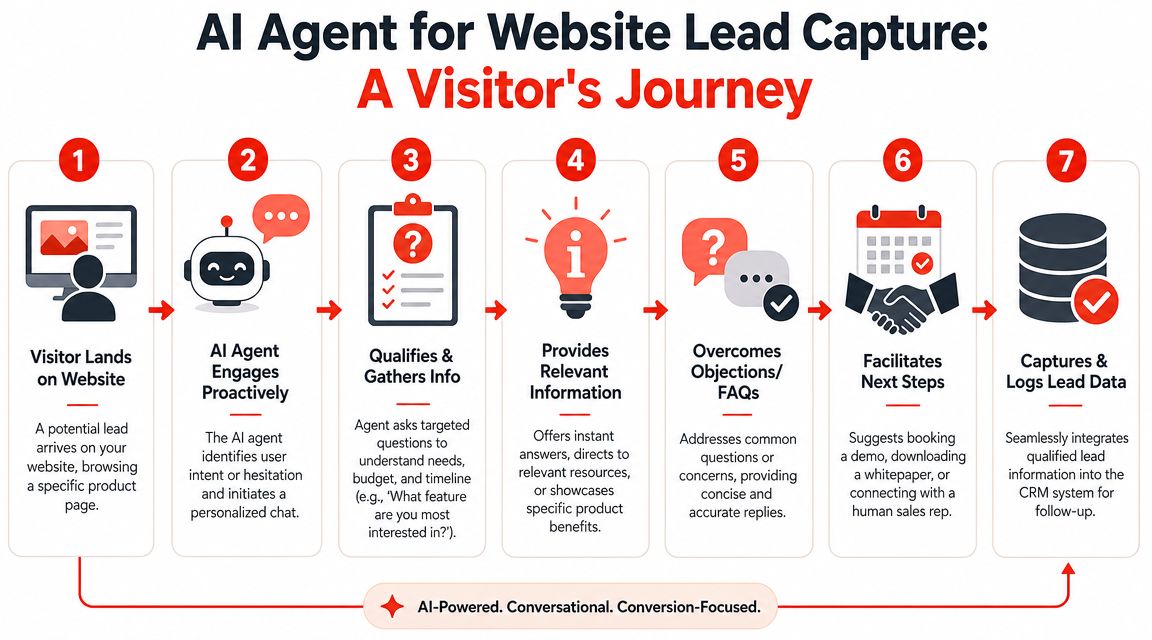
Lead capture is where the difference between a static workflow and an actual agent becomes obvious.
A static chatbot might ask for name, email, and phone, then stop. An agent can hold a conversation that feels closer to what a good intake coordinator would do. It listens, adapts, and decides what to ask next based on what the visitor already said.
A realistic website conversation
Say a visitor lands on a contractor's site late in the evening and types:
“I'm planning a kitchen remodel but I'm not sure whether I need design help first or just a quote.”
That message is messy in the way real buying intent often is. It contains uncertainty, project type, and an opening for qualification.
A weak chatbot says, “Please fill out our contact form.”
A stronger agent responds more like this:
Sure. I can help narrow that down. Are you looking for layout changes, cabinet replacement, or a full remodel? And is the home already occupied?
Those follow-up questions matter because they shape the next move. If the visitor says they want to move walls and they're hoping to start soon, the conversation can continue with timeline, location, and budget readiness. If they're only browsing ideas, the system can guide them to a softer next step.
Why runtime control matters
The technical distinction that matters here is runtime control. Workflows follow predetermined paths. Agent frameworks let the model choose actions dynamically at runtime based on the current conversation state.
That flexibility is especially useful for unstructured lead qualification. It also creates the need for stronger state control, human-in-the-loop checkpoints, and observability so the system doesn't misuse tools or take the wrong action. Industry guidance positions graph-based systems such as LangGraph and Microsoft AutoGen for these more complex, stateful situations, as discussed in ChatBot.com's analysis of agent frameworks.
For SMB lead capture, the practical takeaway is straightforward. If conversations are variable, a simple single-prompt chatbot won't hold up well. A stateful system can ask adaptive questions, qualify progressively, and hand off when confidence drops.
To see the broader idea in motion, this short video gives useful context for how website-based AI interactions can move from passive chat to active qualification.
What a good lead-capture agent actually does
A practical agent on a business website should be able to do most of the following:
- Open naturally: It greets visitors in context, based on the page or the question they asked.
- Clarify intent: It asks follow-up questions that reduce ambiguity.
- Qualify progressively: It gathers the information sales needs, not just contact details.
- Handle objections: It answers common concerns without derailing the conversation.
- Escalate intelligently: It knows when a human should step in.
For service businesses, the handoff logic matters as much as the first response. A visitor with a high-intent, project-specific question should not end up in the same bucket as someone casually browsing.
That's why vertical examples are useful. A contractor-focused implementation, like an AI chatbot for general contractors, tends to work best when it captures project scope, timing, and fit before sales ever sees the lead.
What fails in production
A few common mistakes show up quickly once real visitors start using the system:
- Too many questions too early: The agent feels like a form with extra steps.
- No memory of prior answers: Visitors repeat themselves and lose patience.
- No fallback path: The system pretends to know things it doesn't know.
- No qualification logic: Every transcript looks busy, but sales still gets weak leads.
The best website agent experiences feel conversational on the surface and disciplined underneath. That's the part many demos hide. The quality comes from the logic behind the interaction.
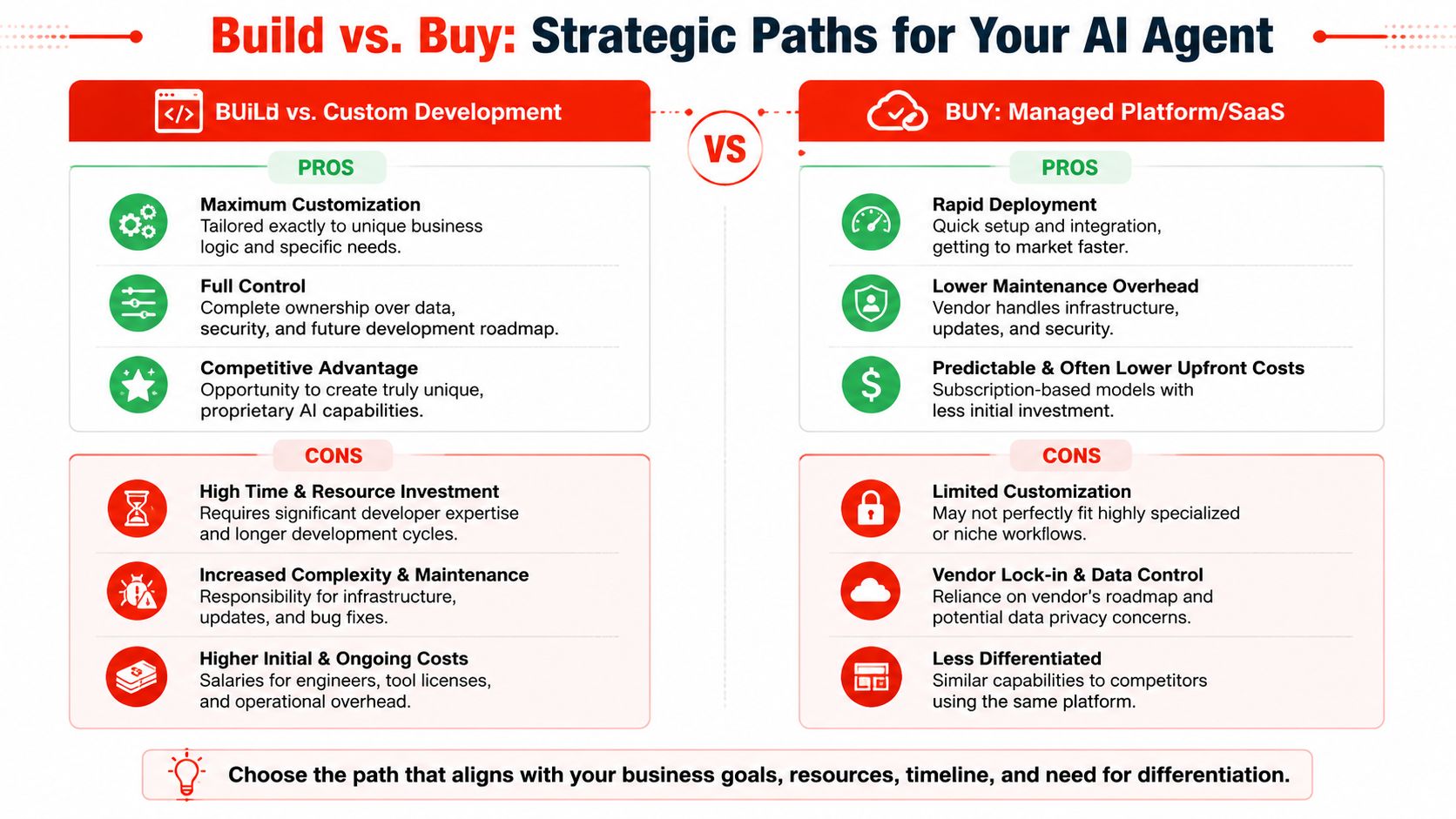
The Smart Path Forward Build vs Buy Your AI Agent
Build if the agent itself is part of your company's core advantage.
Buy if the agent is meant to solve an important but common business problem, especially website lead capture.
That's the cleanest way to think about it.
When building makes sense
A raw framework can be the right choice if you need highly specific business logic, unusual integrations, or internal workflows that no off-the-shelf tool handles well.
That route gives you control. It also gives you responsibility.
One of the most overlooked issues is governance. Security-focused commentary has pointed out that many agent stacks assume the agent can act once it has tools, but they don't natively solve threshold authorization, consumable budgets, or formal safety controls for critical actions. In production, separating an agent's ability to reason from its authority to execute is an essential requirement, as argued in this governance-focused critique of AI agent frameworks.
If your agent can send emails, change records, or trigger spend, that distinction matters immediately.
Don't confuse “the model can decide” with “the system is safe to deploy.”
Why buying is usually the smarter move for SMBs
Most small businesses don't need to invent agent infrastructure. They need a reliable assistant on the website that answers questions, qualifies visitors, and turns conversations into useful lead records.
A managed product usually gets you there faster and with fewer moving parts. You avoid stitching together a framework, model access, retrieval setup, analytics, and support processes on your own. You also reduce the risk that the project becomes dependent on one developer or technical freelancer.
That doesn't mean buying is perfect. You give up some flexibility. You may accept opinionated workflows. But for a common use case like website lead capture, those trade-offs are often sensible.
If you want to explore a managed path built specifically for turning website traffic into qualified conversations, take a look at LeadBlaze.
The most expensive AI project isn't the one with the highest software bill. It's the one that never becomes operational.
If you want a website AI agent without turning your business into a software lab, LeadBlaze is a practical place to start. It's built for the outcome most SMBs care about: greeting visitors instantly, answering questions from your site content, qualifying leads based on your rules, and giving your team concise summaries instead of messy chat transcripts. You can install it quickly, tailor the conversation to your brand, and start capturing better lead context without managing a raw framework yourself.